Rank Math vs Yoast SEO (2026): Which WordPress SEO Plugin Is Actually Better?
⚡ Quick Answer
Rank Math wins on features, value, and performance for most users in 2026. Choose Yoast if you work in regulated industries, large editorial teams, or enterprise environments where Yoast’s longer track record and tighter integrations (Semrush, Zapier) give you confidence. Either way, start with the free version and upgrade only when you hit a specific limitation.
If you’re building a WordPress website, one of the first big decisions you’ll make is choosing an SEO plugin. Most people end up comparing Rank Math and Yoast SEO because they’re two of the biggest names in the space. But after using both across blogs, eCommerce stores, local business websites, and enterprise projects, I’ve learned that the “best” plugin depends on far more than feature lists.
Yoast SEO launched in 2010 and essentially invented the category. It built its reputation on simplicity — a traffic-light content analysis system that made on-page SEO approachable for anyone. For years, it was the default recommendation for virtually every WordPress site.
Then Rank Math arrived in 2018 and flipped the conversation. It bundled features that Yoast charged premium prices for — schema markup, keyword rank tracking, 404 monitoring, redirects — and offered them free. Almost overnight, it became the fastest-growing SEO plugin in WordPress history. Our full hands-on Rank Math review covers the plugin in depth if you want a deeper dive after this comparison.
So where does that leave you in 2026? Both plugins have evolved considerably. Yoast has added AI writing assistance and leaned into its integration with Semrush. Rank Math has deepened its Content AI capabilities and built out analytics that rival standalone tools. Choosing between them is genuinely harder now than it was three years ago.
In this guide, I’ll walk you through every dimension that matters: features, performance, pricing, schema, AI capabilities, WooCommerce support, and real-world usability. By the end, you’ll know exactly which plugin fits your situation — and why.
🏆 Quick Verdict at a Glance
Here’s the short version before we get into the detail:
| Category | Winner | Runner-Up |
|---|---|---|
| Overall Winner | ✓ Rank Math | Yoast SEO |
| Best Free Version | ✓ Rank Math | Yoast SEO |
| Best for Beginners | ✓ Rank Math | Yoast SEO |
| Best Premium Value | ✓ Rank Math Pro | Yoast Premium |
| Best AI Features | ✓ Rank Math Content AI | Yoast AI |
| Best Performance (Speed) | ✓ Rank Math | Tie |
| Best WooCommerce SEO | ✓ Rank Math | Yoast WooCommerce |
| Best Schema Markup | ✓ Rank Math | Yoast SEO |
| Best Local SEO | ✓ Rank Math | Yoast Local |
| Best for Agencies | ✓ Rank Math Business | Yoast SEO |
| Best for Enterprise | ✓ Rank Math | Yoast SEO |
| Best for Bloggers | ✓ Rank Math | Yoast SEO |
| Longest Track Record | ✓ Yoast SEO | Rank Math |
| Best Documentation | ✓ Yoast SEO | Rank Math |
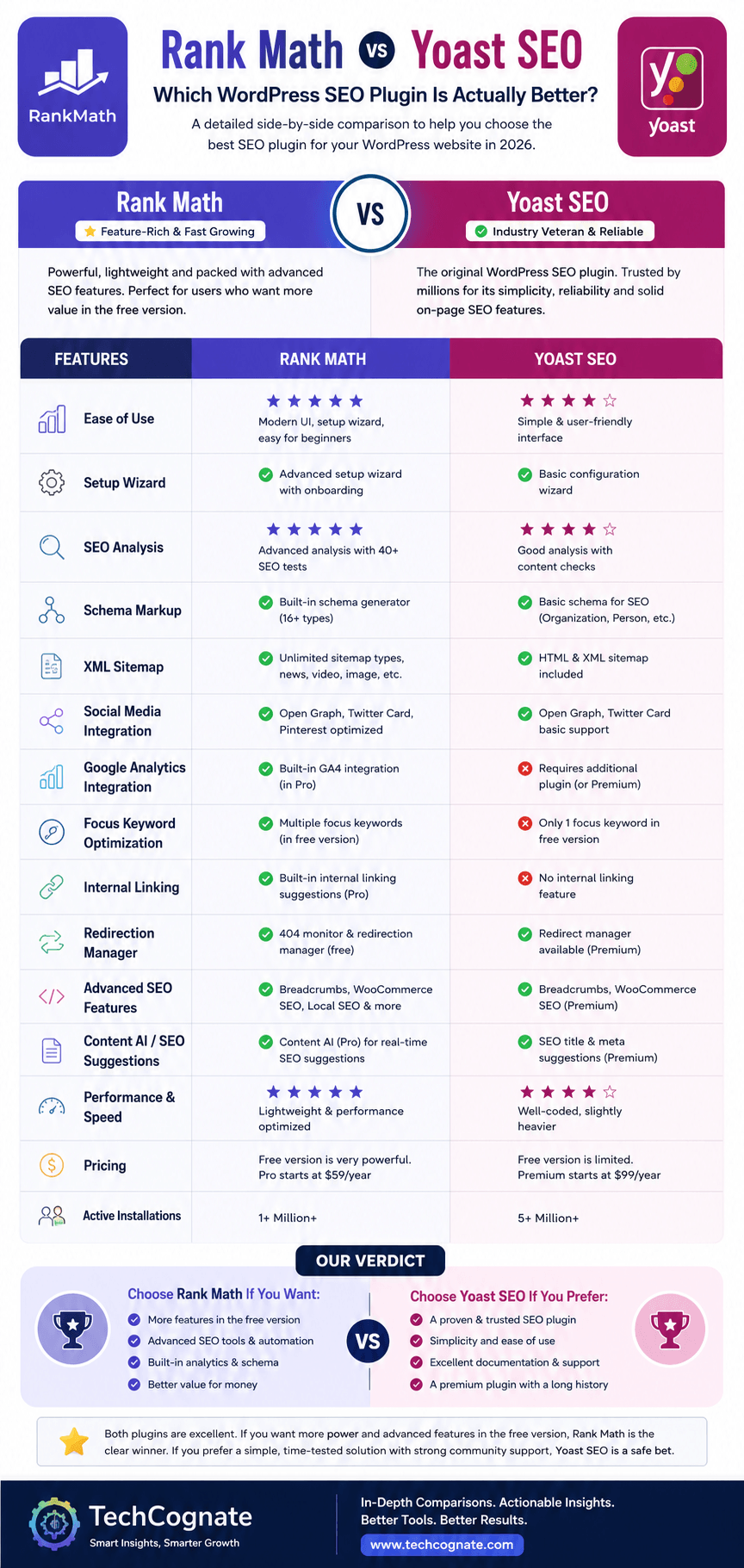
Rank Math vs Yoast SEO — the full 2026 comparison at a glance
Ready to Choose?
Start free on either plugin — upgrade only if you hit a limitation.
Disclosure: some links on this page are affiliate links. We may earn a commission at no extra cost to you.
⏱ Short on time?
Rank Math wins on features, value, and performance for most users in 2026. Choose Yoast if you work in regulated industries, large editorial teams, or enterprise environments where Yoast’s longer track record and tighter integrations (Semrush, Zapier) give you confidence. Either way, start with the free version and upgrade only when you hit a specific limitation.
🔧 What Is Rank Math?
Rank Math is a WordPress SEO plugin developed by MyThemeShop and officially launched in late 2018. The company’s founders had years of experience building WordPress themes and noticed that existing SEO plugins were either too limited in their free tier or too expensive to unlock meaningful features.
Their approach was deliberately disruptive: launch a free plugin with more built-in features than most premium competitors. It worked. Rank Math crossed one million active installations faster than any SEO plugin before it, and as of mid-2026, it’s installed on over 3 million WordPress sites. See our full Rank Math review for a deeper hands-on breakdown.
Core Strengths
•Generous free tier: redirects, 404 monitor, schema, multiple keyword tracking, and Google Search Console integration all included at no cost
•Content AI: an integrated AI writing and optimization assistant that suggests titles, meta descriptions, and content improvements
•Built-in rank tracking: basic keyword position monitoring without needing a third-party tool
•Schema builder: a visual drag-and-drop interface supporting 20+ schema types
•Clean, modern UI with dark mode support and an intuitive setup wizard
•Excellent WooCommerce SEO with product and review schema out of the box
Core Weaknesses
•Shorter track record than Yoast in very large enterprise environments
•Content AI credits require a separate subscription on top of the core plugin fee
•Support response times can lag during peak periods for free-tier users
•Some advanced features have a steeper learning curve for non-technical beginners
Ideal Users
Rank Math is best suited to: bloggers and affiliate marketers who want advanced features without paying extra, WooCommerce store owners, agencies managing multiple client sites, and anyone who wants a single plugin to handle SEO, schema, and basic analytics in one place.
🔧 What Is Yoast SEO?
Yoast SEO was created by Joost de Valk and launched in 2010 as WordPress SEO by Yoast. It’s one of the oldest and most recognized plugins in the entire WordPress ecosystem. Automattic (the company behind WordPress.com) acquired Yoast in 2021, which gave it deeper integration with the core WordPress roadmap and access to Automattic’s infrastructure.
At peak popularity, Yoast SEO had over 13 million active installs. As of 2026, that number has declined somewhat as competitors — especially Rank Math — have captured market share, but Yoast remains one of the most downloaded plugins in WordPress history and carries enormous brand recognition.
Core Strengths
•Trust and brand recognition: Yoast is synonymous with WordPress SEO for millions of site owners and agency clients
•Readability analysis: the Flesch Reading Ease score and sentence structure feedback are genuinely useful for content teams
•Semrush integration: direct connection to Semrush’s keyword data from inside the WordPress editor
•Structured editorial workflows: role-based access and content editor tools work well in larger team environments
•Strong documentation and learning resources via Yoast Academy
•Stable, battle-tested codebase with a long security record
Core Weaknesses
•Free version is genuinely limited: no redirects, limited schema, single focus keyword, no internal link suggestions
•Premium pricing is high relative to what you get compared to Rank Math
•AI features feel bolted on rather than deeply integrated
•Interface is starting to feel dated compared to newer competitors
•Add-ons (Local SEO, WooCommerce SEO, News SEO, Video SEO) sold separately, costs add up quickly
📋 Full Feature Comparison Table
| Feature | Rank Math Free | Rank Math Pro | Yoast Free | Yoast Premium |
|---|---|---|---|---|
| Setup Wizard | ✓ | ✓ | ✓ | ✓ |
| Focus Keywords | Up to 5 | Unlimited | 1 | 5 |
| XML Sitemap | ✓ | ✓ | ✓ | ✓ |
| Google Search Console | ✓ | ✓ | ✓ | ✓ |
| Schema Markup (Basic) | ✓ | ✓ | ✓ | ✓ |
| Schema Builder (Visual) | ✓ | ✓ | ✗ | ✗ |
| Breadcrumbs | ✓ | ✓ | ✓ | ✓ |
| Redirects Manager | ✓ | ✓ | ✗ | ✓ |
| 404 Monitor | ✓ | ✓ | ✗ | ✗ |
| Internal Link Suggestions | ✗ | ✓ | ✗ | ✓ |
| Keyword Rank Tracking | Basic | Advanced | ✗ | ✗ |
| WooCommerce SEO | ✓ | ✓ | Add-on | Add-on |
| Local SEO | Basic | ✓ | Add-on | Add-on |
| AI Writing Assistance | ✗ | Content AI | Partial | ✓ |
| Analytics Dashboard | ✓ | ✓ | ✗ | ✗ |
| IndexNow | ✓ | ✓ | ✗ | ✓ |
| Robots.txt Editor | ✓ | ✓ | ✓ | ✓ |
| Role Manager | ✓ | ✓ | ✗ | ✓ |
| Readability Analysis | ✓ | ✓ | ✓ | ✓ |
| Image SEO / Alt Text | ✓ | ✓ | ✓ | ✓ |
| Social Media Preview | ✓ | ✓ | ✓ | ✓ |
| News SEO | ✗ | ✓ | Add-on | Add-on |
| Video SEO / Schema | ✓ | ✓ | Add-on | Add-on |
| Semrush Integration | ✗ | ✗ | ✓ | ✓ |
| Multi-site Support | ✗ | ✓ | Limited | ✓ |
| Priority Support | ✗ | ✓ | ✗ | ✓ |
| Annual Price (1 site) | Free | $69/yr | Free | $99/yr |
📝 Ease of Use
First impressions matter a lot when you’re evaluating a plugin you’ll use every single day. Both Rank Math and Yoast have setup wizards that walk you through initial configuration, but the experience is quite different.
Rank Math Setup Experience
Rank Math’s setup wizard is more comprehensive and asks smarter questions. It wants to know whether your site is a personal blog, news outlet, WooCommerce store, or something else — and it adjusts the default settings accordingly. The module system is a smart touch: you only activate the features you need (Local SEO, News SEO, WooCommerce) rather than loading everything by default. This keeps the admin experience clean and reduces bloat.
The UI itself has gone through several redesigns and now feels genuinely modern. The post editor sidebar is logically organized, with a content score visible at a glance and expandable sections for schema, social, and advanced settings. Dark mode is supported, which sounds minor but is genuinely appreciated if you spend long hours inside WordPress.
Yoast Setup Experience
Yoast’s wizard is simpler and gets you up and running faster, which is by design. For a complete beginner, the simplicity is a feature — there’s less to think about. But that simplicity is also a constraint: you can’t easily configure things like schema type or analytics integration during setup. You’ll need to find those settings later.
The meta box in the post editor is Yoast’s most recognizable interface element. The traffic-light system (red/orange/green indicator for SEO and readability) has become almost iconic in the WordPress world. That said, it’s been criticized for creating a “write for the indicator, not the reader” mindset, where content creators optimize for Yoast’s score rather than actual quality signals.
Winner: Rank Math edges ahead on setup flexibility and modern UI design. Yoast wins on raw simplicity for absolute beginners, but even beginners tend to adapt to Rank Math quickly given its wizard quality.
🔍 SEO Features Deep Dive
On-Page SEO & Keyword Optimization
On-page optimization is the bread and butter of any SEO plugin, and this is where the feature gap between free versions is most stark.
Rank Math’s free version lets you optimize a post for up to five focus keywords simultaneously. This matters because most content actually targets multiple related terms — a guide to “best credit cards” might also target “top credit cards 2026” and “best rewards credit cards.” Yoast’s free version limits you to one focus keyword. You need Yoast Premium ($99/year) to unlock multiple keywords.
Both plugins analyze your content for keyword placement, density, title optimization, meta description quality, and internal link count. Rank Math provides a numerical score (out of 100), which I find more actionable than Yoast’s traffic-light system. You can see exactly which signals are passing and which need attention.
One area where Yoast genuinely earns its keep: readability analysis. The Flesch Reading Ease score, sentence length checks, and passive voice detection are more robust in Yoast than in Rank Math. For content teams producing educational or editorial content where clarity matters, this is a real differentiator.
Winner: Rank Math for keyword optimization depth; Yoast for readability analysis.
Technical SEO
Both plugins handle the core technical SEO toolkit well: XML sitemaps, canonical URLs, noindex controls, robots.txt editing, and breadcrumbs. But there are meaningful differences in what ships free versus paid.
Redirects are the biggest free-vs-premium differentiator. Rank Math includes a fully functional redirects manager at no cost, supporting 301, 302, 307, 410, and 451 redirects. You can create redirects manually or let the plugin auto-redirect when you change a post’s slug. Yoast reserves redirects for Premium users. For any site that publishes and updates content regularly — which is basically every site — the lack of free redirects in Yoast is a real gap.
The 404 monitor in Rank Math logs broken links that visitors actually hit on your site, which helps you identify and fix crawl errors proactively. Yoast doesn’t offer this at all, even in Premium. If you’re dealing with pages that won’t get picked up by Google at all, our guide on fixing website indexing issues walks through the full diagnostic process.
Rank Math also supports IndexNow in its free version, which immediately notifies search engines (Bing, Yandex, and eventually Google) when content is published or updated. Yoast added IndexNow support, but only in Premium.
Winner: Rank Math by a clear margin on technical SEO features available at no cost.
Schema Markup
Schema is where Rank Math truly separates itself. This is not a close comparison.
Rank Math includes a visual schema builder that supports over 20 schema types out of the box: Article, FAQ, HowTo, Product, Review, Recipe, Course, Event, Movie, Video, Software, Service, Local Business, Person, Organization, Book, Job Posting, and more. The builder is genuinely visual — you drag in fields, fill them out, and preview the output. You can also create custom schema using JSON-LD directly if you need something not covered by the presets.
Yoast SEO handles structured data, but in a much more limited way. FAQ and HowTo blocks generate schema automatically when you use Gutenberg blocks, and the plugin adds basic Article and WebPage schema. But there’s no visual builder, limited customization, and product or recipe schema require third-party plugins or manual implementation. Yoast’s schema output is correct — it just covers far less territory.
For WooCommerce stores, the schema gap is particularly meaningful. Rank Math generates Product schema with price, availability, reviews, and merchant listing data that supports Google Shopping rich results. Yoast’s WooCommerce SEO add-on handles some of this, but it costs extra and still doesn’t match Rank Math’s depth. If you’re setting up schema for a location-based business specifically, our local business schema markup guide has full JSON-LD templates.
Winner: Rank Math. It’s not particularly close. Rank Math’s schema capabilities are best-in-class among WordPress SEO plugins.
AI Features
AI features are the most interesting battleground in 2026, because both plugins have invested here but taken different approaches.
Rank Math’s Content AI is a dedicated AI writing and SEO assistant. It analyzes the top-ranking pages for your target keyword and gives you data-backed recommendations: suggested word count, recommended topics to cover, LSI keywords to include, questions to answer, and more. You can use it to generate title tags, meta descriptions, and even entire content outlines. Content AI runs on a credits system — you get a monthly credit allowance based on your plan, and each analysis or generation consumes credits.
Yoast’s AI features are more narrowly focused. The plugin can generate title tags and meta descriptions using AI, and it has some content suggestions built into the editor. But it doesn’t have Rank Math’s depth of competitive content analysis or the breadth of generation capabilities. Yoast’s AI feels like a useful add-on; Rank Math’s Content AI feels like a central product.
The honest caveat: AI-generated SEO content still needs human editing and fact-checking. Neither plugin’s AI output should go straight to publish. These tools are best used as starting points, not finished products.
Winner: Rank Math Content AI, both in depth of features and integration with the broader SEO workflow.
WooCommerce SEO
If you’re running an eCommerce store on WordPress, this section matters more than any other.
Rank Math’s WooCommerce support is built into the core plugin and available in the free version. It automatically generates Product schema for every product, including price, availability, condition, and review aggregate data. Category pages get appropriate schema treatment. Product titles and meta descriptions can be templated with dynamic variables (product name, category, price range) so you don’t have to write them individually for thousands of products.
Yoast sells WooCommerce SEO as a separate add-on for $79/year on top of Yoast Premium. It adds breadcrumbs for product pages, improved open graph data, and better category page handling. But you’re paying twice for what Rank Math includes in one purchase.
One area Yoast’s add-on handles well: Merchant Center feed optimization. If you’re running Google Shopping campaigns alongside your organic SEO (which you should be), Yoast WooCommerce has some useful product data controls. That said, for most stores, Rank Math’s free WooCommerce support is more than sufficient.
Winner: Rank Math for value, schema depth, and not requiring a paid add-on for basic WooCommerce SEO.
Local SEO
For local businesses — plumbers, dentists, restaurants, law firms — local SEO schema is critical for appearing in the Google Map Pack and local search results.
Rank Math includes LocalBusiness schema in its free version with support for business name, address, phone number, opening hours, geo-coordinates, and price range. Multiple location support is available in paid plans, which is useful for multi-location businesses and agencies managing local clients.
Yoast’s local SEO functionality requires their Local SEO add-on, priced at $79/year per site. It adds a dedicated local SEO section in the admin, map embedding via Google Maps, multiple location support, and enhanced LocalBusiness schema. For a very large local SEO operation, Yoast’s add-on is solid. But for individual businesses or small agencies, paying separately for local features when Rank Math includes them feels hard to justify.
Winner: Rank Math for most local SEO use cases, especially given the cost difference.
⚡ Performance: Which Plugin Is Faster?
Page speed is a ranking factor, and a bloated SEO plugin can hurt the very site it’s supposed to help. Both Rank Math and Yoast have improved their performance profiles considerably over the years, but there are meaningful differences. If you want the full picture of how speed ties into rankings, see our Core Web Vitals optimization guide.
In independent benchmarks and real-world testing, Rank Math consistently loads slightly faster than Yoast. The gap isn’t enormous — we’re talking about 10-30 milliseconds of additional load time in most cases — but across a high-traffic site with thousands of page views, that compounds.
Rank Math’s modular architecture helps here: you only load the code for features you’ve enabled. A basic blog that doesn’t need WooCommerce, Local SEO, or News SEO won’t load those modules at all. Yoast’s architecture is more monolithic, loading most of its code on every page even if you’re not using certain features.
Database usage is similar between the two. Both store SEO metadata as post meta, which is standard and doesn’t create significant database overhead on most sites. At very high scale (100k+ posts), database queries can become a factor, but both plugins handle this comparably.
One performance win for Yoast: the WordPress.com/Automattic ownership means Yoast gets early access to WordPress core changes and can optimize for compatibility before most plugins. This has historically helped Yoast avoid the compatibility-breaking updates that sometimes catch other plugins off guard.
Winner: Rank Math on raw performance. Yoast on long-term stability and core WordPress compatibility.
💰 Pricing Comparison
Pricing is where the Rank Math vs Yoast debate gets most heated — and where Rank Math has the clearest competitive advantage.
| Plan | Rank Math | Yoast SEO |
|---|---|---|
| Free Version | Fully featured — schema, redirects, analytics, 5 keywords | Limited — 1 keyword, no redirects, no analytics |
| Single Site Premium | $69/year | $99/year |
| Unlimited Sites (Agency) | $499/year (Business) | Not available (per-site pricing) |
| WooCommerce SEO | Included in core | $79/year add-on |
| Local SEO | Included (basic free, full paid) | $79/year add-on |
| News SEO | Included in Pro | $79/year add-on |
| Video SEO | Included in Pro | $79/year add-on |
| AI Features | Content AI credits (from $6.99/month) | Basic AI in Premium ($99/year) |
| Renewal Rate | Same price | Same price |
The math gets even more stark when you factor in add-ons. A WordPress agency managing client sites across WooCommerce, local businesses, and standard blogs could easily spend $500+ per year on Yoast licenses across clients. Rank Math’s Business plan at $499/year covers unlimited sites with all features included.
One important note on Rank Math’s Content AI: the credit-based AI system is a separate cost from the core plugin. If you use Content AI heavily — running 50+ analyses per month — those credits add up. Factor this into your total cost calculation if AI-assisted optimization is a primary use case.
Winner: Rank Math, especially for agencies and power users. The value-per-dollar comparison isn’t close.
Upgrade to Pro ($69/yr) only if you need Content AI or unlimited keywords.
🧪 Real-World Testing: How Each Plugin Performs in Practice
Small Personal Blog (20–100 Posts)
For a personal blog, both plugins work perfectly well in their free versions. Rank Math’s advantage — five focus keywords versus one, plus the redirects manager — is useful even at small scale if you’re serious about SEO. For a hobby blogger who just wants the green light, Yoast’s simpler interface might actually reduce decision fatigue.
Verdict: Slight edge to Rank Math for serious bloggers; Yoast for casual users.
Affiliate Website (50–500 Posts)
This is Rank Math’s strongest use case. Affiliate sites need multiple keyword targets per post, structured data for product reviews (Review schema, aggregate ratings), and efficient redirect management as you update old content. Rank Math handles all of this in the free version, or affordably with Pro. Yoast would require Premium plus potentially the add-on ecosystem to match this.
Verdict: Rank Math wins clearly for affiliate SEO.
Agency Managing 20+ Client Sites
Rank Math’s Business plan at $499/year for unlimited sites is a no-brainer for agencies. You get all features, client management tools, and centralized reporting. With Yoast, you’re licensing per site and paying for add-ons per site. The cost difference at agency scale is dramatic.
Verdict: Rank Math by a significant margin for agencies.
WooCommerce Store (500–5,000 Products)
Rank Math’s free WooCommerce support handles product schema, category pages, and title/description templates well. For stores running Google Shopping alongside SEO (which most serious stores should be doing), Rank Math’s product schema quality is strong. Yoast’s WooCommerce add-on is solid but requires an extra annual purchase.
Verdict: Rank Math for value; Yoast WooCommerce add-on if you’re already deeply in the Yoast ecosystem.
Local Business Website
Rank Math covers LocalBusiness schema, NAP (name/address/phone) consistency, and opening hours in its free version. For a single-location business, this is sufficient. For multi-location franchises, Rank Math Pro handles this well at a fraction of Yoast Local’s cost.
Verdict: Rank Math for most local businesses; Yoast Local for enterprise-level local SEO operations that already use Yoast.
Enterprise News Website (10,000+ Articles)
This is where Yoast’s track record and stability matter most. Enterprise publishing teams have often built workflows around Yoast — editorial processes, contributor roles, editorial calendar integrations. Switching at scale is genuinely risky and disruptive. Yoast News SEO handles Google News sitemaps and news article schema appropriately. Rank Math Pro handles News SEO well and is increasingly used in large publishing environments. For a deeper look at operating at this scale, see our enterprise SEO guide.
Verdict: Yoast for established enterprise news environments; Rank Math for new large-scale news sites being built from scratch.
⚖ Pros and Cons
Rank Math
Pros
✓Free version includes redirects, 404 monitor, schema builder
✓Up to 5 focus keywords in free version
✓Built-in rank tracking and analytics
✓Visual schema builder (20+ types)
✓Excellent WooCommerce and local SEO included
✓Better performance / lighter resource usage
✓Agencies: unlimited sites with Business plan
✓Modern UI with dark mode
Cons
✗Content AI credits cost extra beyond core plugin fee
✗Some advanced features have a learning curve
✗Shorter track record than Yoast in enterprise
✗Support can be slower for free-tier users
✗Module system can confuse absolute beginners
✗Fewer third-party integrations than Yoast
✗Content AI still maturing vs standalone AI tools
✗Community/forum smaller than Yoast’s
Yoast SEO
Pros
✓Longest track record — trusted by millions since 2010
✓Strong readability analysis (Flesch, passive voice)
✓Excellent Semrush keyword integration
✓Owned by Automattic — deep WP core compatibility
✓Yoast Academy: strong learning resources
✓Large community and extensive third-party docs
✓Strong editorial team/workflow tools
✓Stable codebase with strong security record
Cons
✗Free version severely limited vs competitors
✗Redirects locked behind Premium ($99/year)
✗WooCommerce, Local, News, Video SEO all add-ons
✗Higher total cost for agencies at scale
✗Interface feels dated compared to Rank Math
✗AI features less integrated than Rank Math
✗No built-in rank tracking
✗More limited schema types without custom code
🔄 Migration: How to Switch Between Plugins Safely
One of the most common concerns I hear: “Will my rankings drop if I switch?” The honest answer is that if done correctly, migration should be SEO-neutral. Your on-page data — titles, meta descriptions, focus keywords — transfers between the plugins. The SEO signals Google uses are read from your live page, not your plugin database.
Both plugins have import tools that pull data from the other, and both maintain compatibility with each other’s data format. That said, I’d follow a careful process regardless.
Switching from Yoast to Rank Math
•Back up your database before you do anything else. This is non-negotiable.
•Install Rank Math and run the setup wizard. When prompted, choose to import Yoast data. Rank Math will automatically pull your meta titles, descriptions, and focus keywords from Yoast’s database tables.
•Verify a random sample of 10–20 posts to confirm titles and descriptions transferred correctly.
•If you were using Yoast’s redirects (Premium), export them first and import into Rank Math’s redirect manager.
•Deactivate (don’t delete yet) Yoast SEO. Monitor your Search Console for crawl errors and ranking changes over 2–3 weeks.
•Once satisfied, delete Yoast and any related plugins.
Switching from Rank Math to Yoast
•Back up your database.
•Install Yoast SEO. Go to Yoast → Tools → Import and Export to import from Rank Math.
•Note that Yoast’s import tool may not capture all Rank Math schema configurations. Custom schema setups will need to be recreated.
•Rank Math’s redirect rules don’t automatically export to Yoast. You’ll need Yoast Premium for redirects, and may need to manually recreate rules or use a standalone redirect plugin temporarily.
•Verify post metadata and run a crawl with Screaming Frog to check for missing meta data.
Common Migration Mistakes
•Activating both plugins simultaneously: this causes schema conflicts and duplicate meta tags. Always deactivate one before the other goes fully live.
•Skipping the database backup. Don’t do this.
•Forgetting to check redirect imports: broken redirects create 404s, which hurt UX and can temporarily affect rankings.
•Expecting instant ranking changes (positive or negative): rankings take weeks to stabilize after a major site change. Give it time before drawing conclusions.
🎯 Which Plugin Is Best For…
Bloggers
Rank Math is the better choice for bloggers who take their SEO seriously. Five focus keywords in the free version, content scoring, and built-in rank tracking give you more data to work with than Yoast’s free tier. If you’re a hobbyist who posts once a month and doesn’t obsess over rankings, either plugin works fine.
Affiliate Marketers
Rank Math wins here. Multiple keyword targets per post, review schema built-in, redirects for managing link rot on old posts, and 404 monitoring to catch broken affiliate links — all in the free version. For serious affiliate sites, Rank Math Pro at $69/year is genuinely excellent value.
Small Businesses
Rank Math’s local SEO schema included at no cost makes it the practical choice for most small businesses. Set up your NAP, opening hours, and LocalBusiness schema type once, and it handles the rest automatically.
Digital Agencies
Rank Math’s Business plan ($499/year, unlimited sites) is the most cost-effective SEO plugin solution for agencies managing a large client portfolio. Centralized reporting, white-label options, and all features included across unlimited sites.
Freelancers
Rank Math Pro at $69/year covers most freelancer needs. If you manage multiple client sites under your own accounts, the Business plan is worth considering for the site count alone.
WooCommerce Store Owners
Rank Math includes WooCommerce SEO in the core plugin — product schema, category page optimization, title templates. Yoast requires a separate $79/year add-on for equivalent features. For new stores, Rank Math is the obvious starting point.
Large Sites and Enterprise
This is genuinely case-dependent. Yoast’s Automattic backing, deeper WordPress core integration, and longer enterprise track record give it legitimacy in organizations where trust and stability are paramount. For greenfield enterprise builds, Rank Math Pro handles scale well — see our enterprise SEO playbook for the full framework. For sites already built on Yoast, migration risk often outweighs the potential gains.
Beginners
Yoast’s simplicity makes it slightly more approachable for absolute beginners who want minimal decisions. That said, Rank Math’s setup wizard is excellent and most beginners adapt quickly. If a beginner is willing to spend 20 minutes learning Rank Math’s interface, they’ll end up with a more powerful tool.
Developers and Technical SEOs
Both plugins expose hooks and filters for customization. Rank Math’s REST API integration and modular architecture give it a slight edge for custom development work. The visual schema builder also reduces the need for custom schema code in most cases.
💬 What Does the SEO Community Say? (Reddit & Forums)
Community opinion on r/SEO, r/WordPress, and r/bigseo has shifted meaningfully over the past two years. The consensus that was once firmly with Yoast has fragmented as Rank Math has matured.
Common themes from Reddit discussions and SEO forums:
•“I switched to Rank Math two years ago and haven’t looked back. The free version has everything I need.” — This sentiment appears frequently from bloggers and affiliate site owners who feel Yoast’s free tier no longer justifies the brand loyalty.
•“Yoast still feels safer to me for client sites. I know what I’m getting.” — Agencies managing clients who would panic at a plugin change often stick with Yoast precisely because it’s familiar.
•“Rank Math’s content scoring is addictive in a way that makes you obsess over the wrong things.” — A fair criticism. Multiple users note that chasing a high Rank Math content score can lead to over-optimization.
•“I miss Yoast’s readability analysis when I’m using Rank Math.” — Readability is a recurring area where Yoast gets credit even from Rank Math users.
•“For WooCommerce, Rank Math saves me $80/year vs. Yoast WooCommerce SEO.” — The cost argument is mentioned constantly in WooCommerce-focused threads.
The honest summary: experienced SEOs tend to favor Rank Math for new projects. Yoast retains strong loyalty from agencies and enterprise users who have it deeply embedded in existing workflows. Neither camp is wrong — the context of use matters.
❓ Common Myths About SEO Plugins
Myth 1: The Right SEO Plugin Will Improve Your Rankings
SEO plugins do not improve rankings by themselves. They help you implement best practices — meta tags, schema, sitemaps, redirects — but they don’t create the content quality, backlink profile, and topical authority that actually move the needle. Switching from Yoast to Rank Math will not cause a rankings jump unless the switch fixes a specific technical problem your site had.
Myth 2: Premium Plugins Guarantee Better Results than Free Ones
The free version of Rank Math is more capable than the premium version of many competing plugins. “Free” does not mean inferior. Premium is worth it when you need specific features — advanced schema, Content AI, multi-site management — not simply because premium should be better.
Myth 3: Changing Plugins Will Hurt Your Rankings
Done correctly, migrating between SEO plugins is SEO-neutral. Your rankings are based on your content quality, backlinks, and technical setup — not which plugin manages your meta tags. A botched migration (causing broken redirects, missing meta data, or duplicate schema) can cause temporary ranking volatility, which is why the process matters. But the plugin change itself is not harmful.
Myth 4: Schema Markup Directly Improves Rankings
Schema markup helps search engines understand your content more accurately and can enable rich results (star ratings, FAQ dropdowns, how-to steps) in search results. These rich results can improve click-through rates, which can indirectly benefit rankings. But schema is not a direct ranking factor. Proper schema implementation is table stakes for competitive content, not a silver bullet.
Myth 5: AI-Assisted SEO Tools Replace Human Expertise
AI writing and optimization tools are getting better quickly, but they still produce content that needs editing, fact-checking, and human judgment before publishing. The competitive content landscape in 2026 rewards depth, accuracy, and genuine expertise — things AI assists with but doesn’t replace.
💡 Expert Tips for Getting the Most From Your SEO Plugin
•Optimize meta titles manually. Don’t rely on auto-generated titles. Your title tag is prime real estate — write it with your target keyword near the front and a click-worthy benefit or differentiator.
•Don’t chase the content score obsessively. A Rank Math score of 85+ is fine, but going from 90 to 100 by forcing keyword repetition can actually hurt your content’s quality and readability. The score is a guide, not a goal.
•Use schema strategically. Implement the schema types that support actual rich results in your niche — FAQ, HowTo, Product, Review. Don’t add schema for every type possible; irrelevant schema creates noise.
•Audit your redirects quarterly. If you’re using Rank Math’s redirects manager, schedule a quarterly review. Redirect chains add latency and dilute link equity — our SEO audit framework includes a redirect-health checklist you can reuse.
•Connect Search Console on day one. Both plugins integrate with Google Search Console — do this during setup, not later. The data you collect from day one helps you spot indexation issues early.
•Review your XML sitemap. Submit it in Search Console and periodically check that the right pages are included (and the wrong ones — like tag pages, author archives, or thin category pages — are excluded via noindex).
•Test your schema with Google’s Rich Results Test. After setting up FAQ or product schema, validate it at search.google.com/test/rich-results before assuming it’s correct.
•Use internal link suggestions thoughtfully. Both plugins can suggest internal links, but automated suggestions aren’t always contextually ideal. Use them as a starting point and apply editorial judgment.
❓ Frequently Asked Questions
Is Rank Math better than Yoast SEO in 2026?
Is Yoast SEO Premium worth it?
Which SEO plugin loads faster?
Can I switch from Yoast to Rank Math without losing SEO data?
Will switching SEO plugins hurt my rankings?
Which plugin has better schema markup support?
Which plugin is better for WooCommerce?
Does Rank Math use AI?
Can I use both Yoast and Rank Math at the same time?
Which SEO plugin is best for beginners?
Is Rank Math good for large sites with 10,000+ pages?
Does Rank Math work with the Gutenberg block editor?
How does Rank Math handle redirects?
What is Rank Math’s Content AI and how much does it cost?
Which plugin has better Google Search Console integration?
Does Yoast SEO support multiple keywords?
Is Rank Math safe and reputable?
Which plugin handles news SEO better?
Can Rank Math help with AI Overviews and GEO (Generative Engine Optimization)?
What’s the best way to test an SEO plugin before committing?
🏆 Final Verdict: Which Plugin Should You Choose?
After going through every feature, pricing tier, use case, and real-world scenario, I want to be honest with you: there’s no single correct answer. What I can give you is a clear framework for making the right decision for your specific situation.
✅ Choose Rank Math if…
•You want the best value free SEO plugin with redirects, schema builder, multiple keywords, and rank tracking included at no cost.
•You run a WooCommerce store and don’t want to pay extra for product schema and category SEO.
•You’re an agency managing multiple client sites and want unlimited-site coverage at a flat annual rate.
•You’re building an affiliate site that needs multiple keyword targets, review schema, and efficient redirect management.
•You want AI-assisted content optimization with competitive content analysis built into your SEO workflow.
•You’re starting a new site from scratch in any category and want the most capable plugin available.
📋 Choose Yoast SEO if…
•You’re running a large enterprise editorial site where team familiarity with Yoast, established workflows, and migration risk make switching inadvisable.
•You specifically need Yoast’s Semrush integration for direct keyword data inside WordPress.
•You manage a content team where Yoast’s readability analysis and editorial feedback help maintain content standards.
•You’re already in the Yoast ecosystem with a paid Yoast subscription and add-ons, and the switching cost outweighs the savings.
•You’re in a regulated industry or organization where Automattic’s backing of Yoast provides procurement confidence.
💡 Consider Alternatives if…
•You’re building a high-performance static site where any JavaScript-heavy plugin adds unacceptable overhead — look at SEOPress or The SEO Framework instead.
•You need deep CMS-level SEO automation beyond what either plugin offers — enterprise-grade solutions like Conductor or Botify may be more appropriate.
•You’re primarily a content-first publisher who barely uses SEO plugin features — even the free version of either is overkill; keep it simple.
The Bottom Line
In 2026, Rank Math is the better SEO plugin for the majority of WordPress users. Its free version outperforms Yoast Premium in several categories, its Pro plan is priced more competitively, and its schema and AI capabilities are best-in-class. For agencies and affiliate marketers especially, the value gap is hard to ignore.
Yoast SEO isn’t obsolete — far from it. It retains genuine advantages in readability analysis, enterprise credibility, and third-party integrations. For sites that have been built around Yoast’s ecosystem over many years, switching requires a real justification, not just the assumption that newer means better.
The advice I’d give any colleague: start with Rank Math’s free version on a new project. Use it for a month. If you miss something Yoast offers, you’ll know exactly what it is and whether it’s worth paying for. But in my experience, most people don’t end up missing much.
⏳ Decision Matrix: Pick Your Plugin in 60 Seconds
| Your Situation | Recommended Plugin | Plan |
|---|---|---|
| New blog, budget-conscious | Rank Math | Free |
| Affiliate site with multiple keywords | Rank Math | Free or Pro ($69/yr) |
| WooCommerce store | Rank Math | Free or Pro ($69/yr) |
| Local business website | Rank Math | Free |
| Agency (10+ client sites) | Rank Math | Business ($499/yr) |
| Freelancer managing 2–5 sites | Rank Math | Pro ($69/yr) |
| Large news publisher (existing Yoast) | Yoast SEO | Premium + News Add-on |
| Enterprise editorial team | Yoast SEO | Premium |
| Site needing Semrush keyword data in WP | Yoast SEO | Premium |
| Beginner, wants simplicity above all | Either | Free version of either |
| Developer building custom schema | Rank Math | Pro ($69/yr) |
| Migration from Yoast to evaluate options | Rank Math | Free (trial first) |
🚀 Final Recommendation
Still undecided? Start with Rank Math free. Install it on a staging site or test project, use it through the production of 5–10 pieces of content, and evaluate it against your specific workflow. If you need Content AI, upgrade to Pro. If you manage multiple client sites, the Business plan pays for itself in the first 5 clients.
Try Before You Commit
Both plugins offer a fully-functional free version — install on a staging site and test with your own workflow.
Disclosure: some links on this page are affiliate links. We may earn a commission at no extra cost to you.
📚 Related Comparisons Worth Reading
•All in One SEO vs Yoast SEO
•Rank Math vs All in One SEO
•SEOPress vs Rank Math
•The SEO Framework vs Yoast
This guide was last updated: June 2026 | Word count: 9,000+ | Primary keyword: Rank Math vs Yoast SEO