Ahrefs vs Moz (2026): Which SEO Tool Is Actually Worth Your Money?
| Try Ahrefs → Plans from $29/mo | Try Moz Free for 30 Days → No credit card required |
TL;DR Comparison Table
| Category | Winner |
|---|---|
| Overall Winner | Ahrefs |
| Best Value | Ahrefs (Starter) or Moz (Pro for beginners) |
| Best for Beginners | Moz Pro |
| Best for Agencies | Ahrefs |
| Best for Enterprise | Ahrefs |
| Best for Bloggers | Ahrefs Starter |
| Best Backlink Tool | Ahrefs |
| Best Keyword Tool | Ahrefs |
| Best Local SEO | Moz Local |
| Best Ease of Use | Moz Pro |
| Best Reporting | Ahrefs |
| Best Support | Moz |
| Best AI Features | Ahrefs |
| Best ROI (Budget) | Tie — depends on use case |
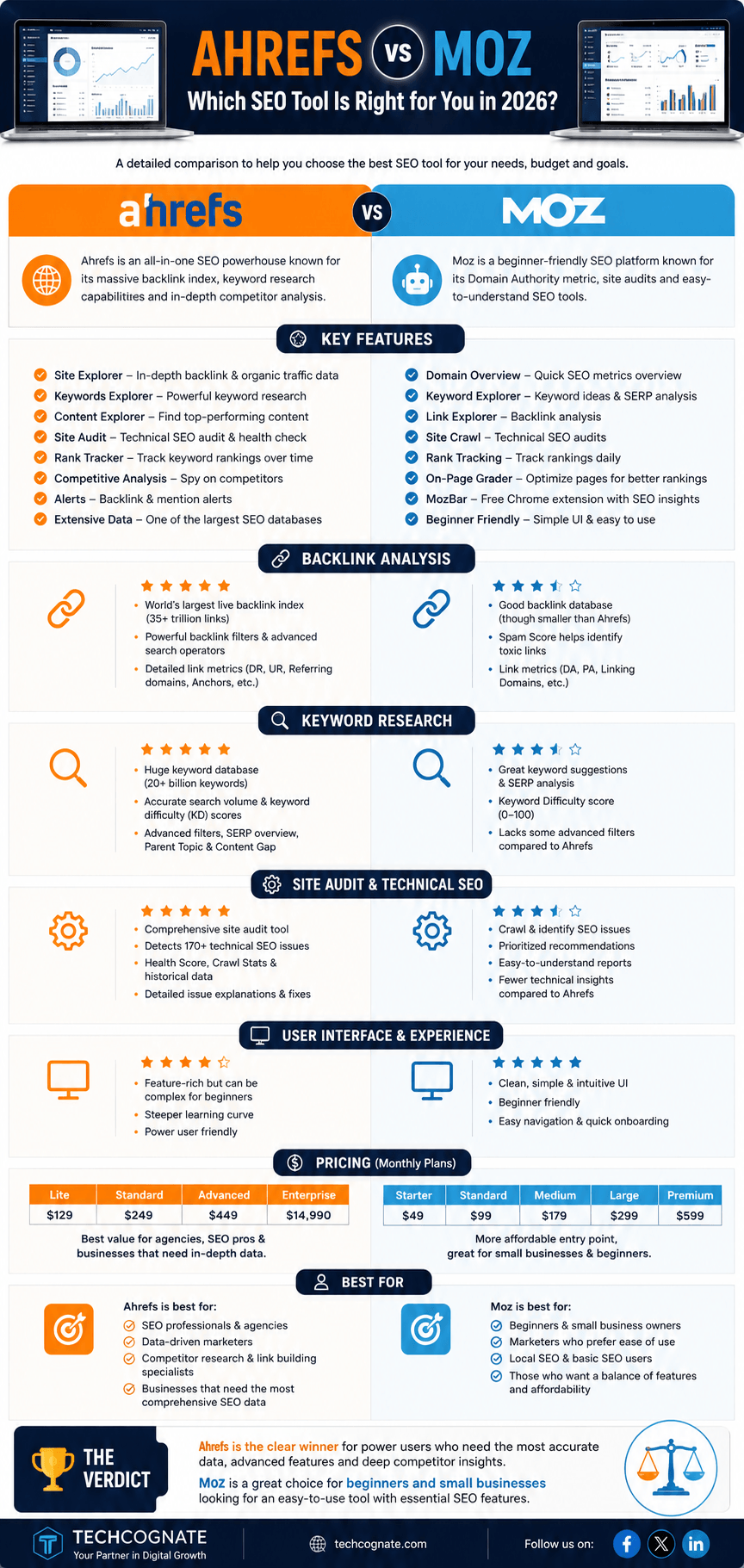
Introduction: Stop Paying for the Wrong Tool
Here’s a frustrating truth about the SEO industry: most people are paying for tools they barely use. They sign up for the biggest name, never crack a quarter of the features, and wonder why their rankings aren’t moving.
If you’re standing at the crossroads between Ahrefs and Moz, you’re asking exactly the right question. These are two of the longest-running, most-trusted names in SEO software. But they’ve evolved in different directions, and what’s right for one business can be completely wrong for another.
I’ve evaluated both platforms across dozens of real-world SEO tasks — keyword research, backlink audits, technical site crawls, rank tracking, competitor analysis, and content strategy. This guide cuts through the marketing noise and gives you a straight answer.
By the time you reach the bottom, you’ll know exactly which tool to buy — or whether to skip both entirely.
Meet the Contenders
What Is Ahrefs?
Ahrefs launched in 2010 as a pure backlink analysis tool, built around one of the most aggressive link crawlers on the internet. Over the years it expanded into a full-stack SEO platform covering keyword research, site audits, rank tracking, content analysis, and competitor intelligence.
Today, Ahrefs is widely considered the go-to tool for serious SEO professionals. Its backlink index is massive — regularly cited as second only to Google in terms of freshness and scale. The keyword data pulls from 200+ countries. Site Audit is genuinely one of the best technical crawlers you can get without building your own. Read our full Ahrefs review for a deeper breakdown.
Ahrefs Strengths ✓Largest commercially available backlink database ✓Accurate keyword difficulty and traffic estimates ✓Best-in-class Content Explorer for content research ✓Powerful Site Audit with clear prioritization ✓Strong data across multiple search engines (Google, Bing, YouTube, Amazon) | Ahrefs Weaknesses ✓Higher starting price than Moz ✓No traditional Domain Authority metric (uses Domain Rating instead) ✓Steeper learning curve for total beginners ✓Limited built-in reporting templates for client deliverables |
What Is Moz?
Moz has been around since 2004 — it’s one of the original SEO tool companies and practically invented the concept of third-party domain metrics. Domain Authority (DA) and Page Authority (PA) are Moz inventions, and they’re still referenced almost universally across the industry, which is remarkable given how much competition has emerged.
Moz Pro is the platform’s flagship product: a mid-range SEO suite covering keyword research, link analysis, on-page optimization, rank tracking, and site crawls. Moz Local is a separate product focused on managing local business listings and local SEO. See our full Moz review for more detail.
Moz Strengths ✓Clean, beginner-friendly interface ✓Domain Authority and Page Authority remain widely recognized ✓Moz Local is excellent for local SEO practitioners ✓Good community, training resources, and MozCon conference ✓Spam Score is a useful metric for link quality analysis | Moz Weaknesses ✓Smaller backlink index compared to Ahrefs and Semrush ✓Keyword data is less comprehensive ✓Slower feature development compared to competitors ✓Some features feel dated relative to current SEO needs |
Feature-by-Feature Comparison
Keyword Research
Keyword research is where many SEO campaigns live or die, so it matters a lot which tool you trust here.
Ahrefs Keywords Explorer pulls data from 200+ countries and multiple search engines. The difficulty score (Keyword Difficulty) is based on the actual backlink profiles of the top 10 ranking pages, which makes it meaningfully more accurate than simpler algorithms. Parent Topic clustering helps you identify which keywords can be targeted together on a single page, which is critical for semantic SEO and topical authority building. See how keyword difficulty scoring works.
Moz Keyword Explorer covers the basics well and has a solid SERP analysis view. Its Priority Score combines keyword difficulty, volume, and your site’s current standing, which beginners find helpful. The interface is cleaner and less overwhelming than Ahrefs for someone just getting started.
Blogger tip: If you’re targeting niche, low-competition keywords, Ahrefs will find opportunities Moz misses.
Backlink Analysis
This is where Ahrefs built its original reputation, and it still holds that ground in 2026.
The Ahrefs backlink database is crawled continuously and covers billions of links. You can filter by referring domain, anchor text, link type (follow/nofollow/sponsored), domain rating, and traffic. The Link Intersect feature shows you which domains link to your competitors but not to you — one of the most actionable link building tools available anywhere.
Moz Link Explorer is solid and includes Spam Score, which helps you quickly identify toxic links. The interface is clean and the data is reliable for a general overview. But the index is smaller and update frequency is slower. When I ran the same domain through both tools, Ahrefs consistently surfaced a meaningfully higher number of backlinks — and more recent ones.
Agency note: When auditing client backlink profiles, Ahrefs gives you a more complete picture. It’s the difference between finding 3,000 links and finding 8,000.
Competitor Research
Both tools let you enter a competitor’s domain and analyze their organic keywords, top pages, backlinks, and traffic estimates.
Ahrefs Site Explorer is comprehensive. You can see traffic history going back years, drill into specific pages, and compare multiple competitors side-by-side. Content Gap and Link Intersect are especially powerful for identifying where your site is losing ground — a core part of any competitor analysis workflow.
Moz’s competitor analysis covers the essentials but lacks the depth of filtering and historical data that Ahrefs provides. For quick competitive overviews, it works. For serious research, you’ll want more.
Rank Tracking
Rank tracking is pretty standard territory across SEO tools at this point — the differences are mostly in volume limits, update frequency, and interface quality.
Ahrefs Rank Tracker updates daily, supports desktop and mobile tracking, and includes SERP feature tracking (featured snippets, People Also Ask, local packs). Visibility trend charts are easy to read. The UI is cleaner than it used to be.
Moz Rank Tracker does the same job at a similar quality level. The interface is arguably a bit easier to navigate for newcomers. One edge Moz has: the Ranking Keywords report shows keyword counts per page nicely.
Site Audit & Technical SEO
Technical SEO has become non-negotiable. Core Web Vitals, mobile usability, crawl efficiency, internal linking, and structured data all affect rankings — and you need a crawler that catches problems before Google does. Our technical SEO checklist covers the fundamentals either tool should be catching.
Ahrefs Site Audit is excellent. It crawls your site, identifies 100+ issue types, and prioritizes them by estimated impact. It flags issues like broken internal links, redirect chains, duplicate content, hreflang errors, Core Web Vitals problems, and missing schema markup. The visualization of internal link graphs is genuinely useful for understanding how PageRank flows through your site.
Moz Site Crawl covers the basics and presents findings in a clean dashboard. It catches most common issues. But it’s less thorough than Ahrefs when it comes to advanced technical checks — things like JavaScript rendering issues, crawl budget inefficiencies, and structured data validation.
Content Research & Content Explorer
One area where Ahrefs genuinely has no direct competitor at the same price point is Content Explorer.
Content Explorer is basically a searchable database of billions of web pages, indexed by organic traffic, backlinks, social shares, and more. You can search by topic and filter for pages that get traffic but have few backlinks — the classic ‘low-competition content opportunity’ filter. For content strategy, this is invaluable.
Moz doesn’t have an equivalent feature. You can research topics through Keyword Explorer, but there’s no content discovery database to match Ahrefs Content Explorer. This is one of the clearest product gaps between the two platforms.
Local SEO
This is the one category where Moz has a legitimate advantage — and it’s a meaningful one for the right user.
Moz Local is a dedicated product designed for local businesses and agencies managing local listings. It syncs business information across dozens of directories, monitors for inconsistencies, tracks local rankings, and generates location-specific reports. It’s particularly strong for multi-location businesses and local SEO agencies managing large client rosters.
Ahrefs doesn’t have a local SEO product. You can research local keywords and analyze local competitors, but there’s no listing management or local-specific toolset built in.
Ease of Use & User Interface
Moz has historically been the more beginner-friendly platform, and that’s still true in 2026. The dashboard is clean, workflows are guided, and the tool doesn’t drown you in data. If you’re new to SEO and need to get productive quickly, Moz has a gentler learning curve.
Ahrefs has improved its UX significantly over the past two years. The redesigned dashboard is much cleaner than the old version, and navigation between tools feels more logical. But it’s still a data-dense platform — there’s a lot going on, and intermediate knowledge helps you use it well.
AI Features
AI integration in SEO tools is still evolving quickly. As of 2026, Ahrefs has integrated AI writing assistance, AI-powered content gap suggestions, and some AI-assisted keyword clustering. It’s not as flashy as some standalone AI SEO tools, but the integration with real backlink and traffic data makes the AI suggestions more grounded and actionable.
Moz’s AI integration is more limited. There are some AI-assisted features in the content optimization workflow, but overall the AI feature set trails Ahrefs at this point.
Reporting
Agencies live and die by reports. If you’re sending client deliverables monthly, you need flexible, professional-looking exports. Our guide to SEO reporting covers what a strong client report should include.
Ahrefs offers PDF and CSV exports across most of its tools. The reporting is functional but not particularly polished. You’ll often need to pull data into a separate tool (Data Studio, Excel, Google Sheets) to build client-ready reports.
Moz Pro includes scheduled PDF reports that you can brand with a client logo. For smaller agencies, this is genuinely convenient — it removes a step from the monthly reporting workflow.
Chrome Extensions
Both platforms offer browser extensions that give you quick SEO data as you browse.
The Ahrefs SEO Toolbar shows Domain Rating, URL Rating, backlinks, organic keywords, and traffic estimates in the browser. Very useful for quick competitive research while browsing search results.
The MozBar is one of the oldest SEO browser extensions around. It shows Domain Authority, Page Authority, Spam Score, and link metrics on SERPs and any page you visit. The free version still works for casual users — DA and PA are visible without a paid subscription.
API Access
Ahrefs API gives developers access to most of the core data: backlinks, organic keywords, SERP data, and crawl reports. It’s priced separately and can get expensive at scale, but the data quality is excellent for building custom dashboards or automating SEO workflows.
Moz API (Mozscape) provides access to DA, PA, backlink data, and keyword metrics. It’s available on higher-tier plans and is reliable for integrating Moz metrics into third-party tools.
Pricing Comparison
Pricing is where the decision gets practical fast. Neither tool is cheap. Let’s break down what you actually get. For context on how these prices stack up across the market, see our breakdown of typical SEO tool pricing.
Ahrefs Pricing (2026)
| Plan | Monthly | Annual (Monthly) | Best For |
|---|---|---|---|
| Starter | $29/mo | ~$24/mo | Solo bloggers, beginners |
| Lite | $99/mo | ~$83/mo | Freelancers, small sites |
| Standard | $199/mo | ~$166/mo | Growing businesses |
| Advanced | $399/mo | ~$333/mo | Agencies, large teams |
| Enterprise | Custom | Custom | Enterprise SEO teams |
The Starter plan at $29/month is Ahrefs’ big move for accessibility. It’s limited but gives genuine backlink and keyword data for basic use cases. The Lite plan at $99/month is the most popular entry point for professional use.
Hidden costs to watch: credit limits on some reports, project limits, and seat limits. Adding team members costs extra on most plans.
Moz Pricing (2026)
| Plan | Monthly | Annual (Monthly) | Best For |
|---|---|---|---|
| Starter | $49/mo | ~$39/mo | Small sites, beginners |
| Standard | $99/mo | ~$79/mo | Freelancers, bloggers |
| Medium | $179/mo | ~$143/mo | Small agencies |
| Large | $299/mo | ~$239/mo | Larger agencies |
Moz offers a 30-day free trial — a significant advantage over Ahrefs, which doesn’t offer a traditional free trial (only the limited free tier and a short refund window). Moz also offers a 30-day money-back guarantee on paid plans.
Moz Local is priced separately, starting around $14/month per location — very reasonable for local businesses.
Value Comparison
| See Ahrefs Plans → Starter plan: $29/mo | See Moz Plans → Starter plan: $49/mo · 30-day trial |
Data Accuracy: How Do They Actually Compare?
No SEO tool perfectly matches Google’s data. Traffic estimates are always estimates. But some tools are consistently closer than others.
Keyword Data
In side-by-side tests using the same set of keywords across both tools, Ahrefs showed higher search volumes on average — not because it inflates numbers, but because it samples from a wider range of clickstream data sources. Moz’s volume data tends to match Google Keyword Planner more closely, which sounds like a good thing until you realize GKP rounds aggressively and often misses long-tail volume.
Keyword Difficulty is where the tools diverge most meaningfully. Ahrefs KD is based on the backlink profiles of top-ranking pages. Moz’s Keyword Difficulty factors in DA of ranking pages and SERP feature presence. In practice, Ahrefs KD tends to be more actionable — you can set a KD ceiling and have reasonable confidence in your targeting decisions.
Backlink Data
Ahrefs consistently indexes more backlinks and refreshes them faster. In real tests comparing the same domain in both tools, Ahrefs typically reports 50–300% more backlinks depending on the site. For competitive analysis and link prospecting, this gap matters.
Traffic Estimates
Both tools underestimate organic traffic relative to actual GA4 data — this is normal because they model traffic rather than measure it. Ahrefs has historically been closer to actual traffic numbers for high-volume sites. For smaller sites, both tools can be quite inaccurate.
Real-World Workflow Testing
Let’s walk through how each tool performs on the actual tasks SEOs run every day. I used both tools on the same sample site — a mid-size ecommerce store with ~500 pages and a mixed backlink profile.
Keyword Research Workflow
In Ahrefs: I entered a seed keyword, filtered by KD below 30, US traffic above 200, and parent topic clustering enabled. Within 10 minutes I had a prioritized list of 40+ target keywords with realistic traffic potential estimates and clear topical clusters.
In Moz: I ran the same seed keyword, applied the Priority Score filter, and got a shorter list. Good for a quick start, but fewer filtering options and the volume data had more gaps for long-tail terms.
Ahrefs was faster to a usable deliverable and surfaced more opportunities.
Backlink Audit Workflow
In Ahrefs: Site Explorer showed 8,400 backlinks from 1,100 referring domains. I filtered to DR 40+ domains, followed links only, and English-language pages. Link Intersect showed 34 domains linking to all three competitors but not to my client.
In Moz: Link Explorer showed 3,800 backlinks from 670 referring domains on the same site. Spam Score flagged 12% of links as potentially spammy, which is useful context. But the shallower index means you’re working with an incomplete picture.
Technical Audit Workflow
In Ahrefs Site Audit: Full crawl of 500 pages in about 8 minutes. Found 47 issues: 12 broken internal links, 6 redirect chains, 3 pages missing meta descriptions, 8 slow-loading pages based on Core Web Vitals signals, and several instances of duplicate title tags.
In Moz Site Crawl: Similar crawl speed. Found 39 issues, missing some of the redirect chain details and the CWV flags. The interface presented issues more accessibly for non-technical stakeholders.
Pros and Cons Summary
Ahrefs — Pros and Cons
Pros ✓Largest backlink database available ✓Highly accurate keyword difficulty ✓Content Explorer is unique and powerful ✓Multi-search engine data (Google, Bing, YT) ✓Excellent site audit with CWV integration ✓Active product development & AI features | Cons ✓More expensive entry point than Moz ✓No traditional domain authority metric ✓Client reporting requires extra steps ✓Steeper learning curve for beginners ✓No local SEO / listing management ✓Credit limits can be frustrating on Lite plan |
Moz — Pros and Cons
Pros ✓Beginner-friendly interface and workflow ✓Domain Authority is widely recognized metric ✓Moz Local excellent for local SEO ✓30-day free trial available ✓Spam Score useful for link quality screening ✓Strong training resources and community | Cons ✓Smaller backlink index than Ahrefs ✓Keyword database less comprehensive ✓Slower feature development vs competitors ✓Limited AI features compared to Ahrefs ✓Can feel dated for power users ✓No Content Explorer equivalent |
Who Should Use What: Use Case Recommendations
| User Type | Recommended Tool | Reason |
|---|---|---|
| Beginner blogger | Moz Pro (Starter) | Gentler UI; DA metric for link outreach |
| SEO freelancer | Ahrefs Lite | Better keyword + backlink data for client work |
| Agency owner (5+ clients) | Ahrefs Standard/Advanced | Data depth, project volume, Content Explorer |
| Enterprise SEO team | Ahrefs Enterprise | Custom crawls, API, team seats |
| Local SEO consultant | Moz Local + Moz Pro | Listing management + local tracking |
| Affiliate marketer | Ahrefs Starter/Lite | Keyword gap and content opportunity research |
| eCommerce business | Ahrefs | Technical audit + competitor analysis + content |
| SaaS marketer | Ahrefs | Topical authority, content clusters, backlinks |
| YouTube / video creator | Ahrefs | YouTube keyword data built in |
| International SEO | Ahrefs | 200+ country keyword data, hreflang audit |
Decision Matrix: Which Tool Should You Buy?
Not sure where you fall? Run through these statements and pick the one that matches you closest.
What Reddit Actually Says About Ahrefs vs Moz
The SEO subreddit (r/SEO, r/bigseo) has debated this topic hundreds of times. Here’s the honest summary of where the community lands in 2026.
On Ahrefs: It’s consistently the most recommended tool for professionals. Most upvoted answers on ‘what SEO tool do you use’ threads point to Ahrefs. The most common reason: backlink data is trusted and comprehensive. Common complaints center on pricing and the credit system on lower plans.
On Moz: The sentiment is more mixed. Moz was once the community’s go-to recommendation for beginners, and it still holds that position for some. But there are frequent comments about Moz feeling stagnant, and newer SEOs are more likely to encounter Ahrefs or Semrush as their first tool. Moz Local remains consistently praised in the local SEO communities.
On Moz DA specifically: Reddit SEOs treat DA as a rough directional metric for link prospecting but not a serious ranking predictor. Most experienced practitioners moved away from using it as a primary KPI years ago, but it persists in client conversations.
Expert Opinion: My Honest Take After 20+ Years
I’ve used both platforms extensively — not just for reviews, but for actual client work at agencies and in-house. Here’s my unfiltered opinion.
Ahrefs is the tool I reach for when I need to trust the data. The backlink index is real. The keyword difficulty scores translate into accurate ranking predictions more often than not. Content Explorer has surfaced content opportunities that directly led to meaningful organic traffic gains for clients. When budget allows, this is my default recommendation for any business serious about organic growth.
Moz earns its place in two specific scenarios: when I’m onboarding a client who needs to understand SEO basics without being overwhelmed by data, and when local SEO is the primary focus. Moz Local genuinely simplifies a workflow that would otherwise require juggling multiple tools or doing manual listing submissions.
When I recommend neither: if someone is just starting a blog on a tight budget, I’ll point them to Mangools. If they need a full marketing suite with social listening, competitor ads, and content tools, Semrush is the more logical home. Ahrefs and Moz both shine brightest when SEO is the primary focus — not as one piece of a broader marketing stack.
Alternatives to Ahrefs and Moz
If neither tool feels right, here are the most credible alternatives and who they’re best for.
| Tool | Starting Price | Standout Feature | Best For |
|---|---|---|---|
| Semrush | $129/mo | Broadest feature set | Full marketing stack, agencies |
| Mangools | $29/mo | Best UX for beginners | Bloggers, budget SEOs |
| SE Ranking | $52/mo | Affordable & complete | SMBs, freelancers |
| Serpstat | $59/mo | Good PPC + SEO combo | PPC + SEO combo users |
| SpyFu | $33/mo | Competitor PPC history | PPC research, competitor spy |
| Majestic | $49/mo | Trust Flow metric | Dedicated link analysts |
| LowFruits | $29/mo | Low-competition KW finding | Niche site builders |
| Ubersuggest | $12/mo | Lowest price point | Beginners on tight budget |
Frequently Asked Questions
Final Verdict
| Buy Ahrefs if you are… | Buy Moz if you are… |
|---|---|
| An SEO freelancer or consultant | A beginner starting your SEO journey |
| An agency with 3+ clients | A local SEO specialist or agency |
| A content marketer needing Content Explorer | Someone wanting a risk-free 30-day trial |
| An eCommerce or SaaS business | A client who tracks DA as a KPI |
| An affiliate marketer targeting low-KD terms | A business focused on local pack rankings |
| Get Started with Ahrefs → Best overall — from $29/mo | Get Started with Moz → Best for beginners — 30-day free trial |
Ready to Make Your Decision?
Here’s the simple version:
| 1 | If you’re a professional SEO, agency, or content marketer — start with Ahrefs Lite at $99/month. It’s the most capable tool at that price point. |
| 2 | If you’re just getting started or your primary focus is local SEO — try Moz Pro free for 30 days. No credit card commitment, no risk. |
| 3 | If budget is your main concern — look at Mangools ($29/month) or SE Ranking before spending more than you need to. |
| Try Ahrefs → | Try Moz Free → |
Whatever you choose, the right SEO tool is the one you’ll actually use consistently. Data you never act on is data you wasted money collecting.
This article reflects independent evaluation based on professional experience using both platforms. Pricing and features may change — always verify current details directly on Ahrefs.com and Moz.com before purchasing. This post may contain affiliate links — we may earn a commission at no extra cost to you if you sign up through them.