Each block is one section, sized by how long it is. The orange block is the longest: Frequently Asked Questions (about 5 min). Tap a block to jump.
Quick Verdict at a Glance
Bottom line: BrightLocal wins for most users. Moz Local wins only on price and simplicity.
| Category | Winner | Why |
|---|---|---|
| Best Overall | BrightLocal | More features, better ratings, stronger ROI |
| Best Value | Moz Local | Lower price for basic listing distribution |
| Best for Agencies | BrightLocal | White-label, client portals, bulk management |
| Best for Small Businesses | BrightLocal | Reviews + rank tracking in one place |
| Best Multi-location | BrightLocal | Franchise tools, bulk edits, location groups |
| Best Citation Management | BrightLocal | 1,400+ directories, Citation Tracker |
| Best Reporting | BrightLocal | Custom white-label PDFs, scheduled reports |
| Best Rank Tracking | BrightLocal | Only tool that tracks local grid + Maps |
| Best Reviews Management | BrightLocal | Review requests, responses, SMS automation |
| Best Ease of Use | Moz Local | Simpler interface, faster setup |
| Best Customer Support | BrightLocal | Live chat plus deep knowledge base |
| Best ROI | BrightLocal | More actionable data, faster results |
If you’re in a hurry: Choose BrightLocal if you want a complete local SEO toolkit. Choose Moz Local if you have a very tight budget and only need listing distribution.
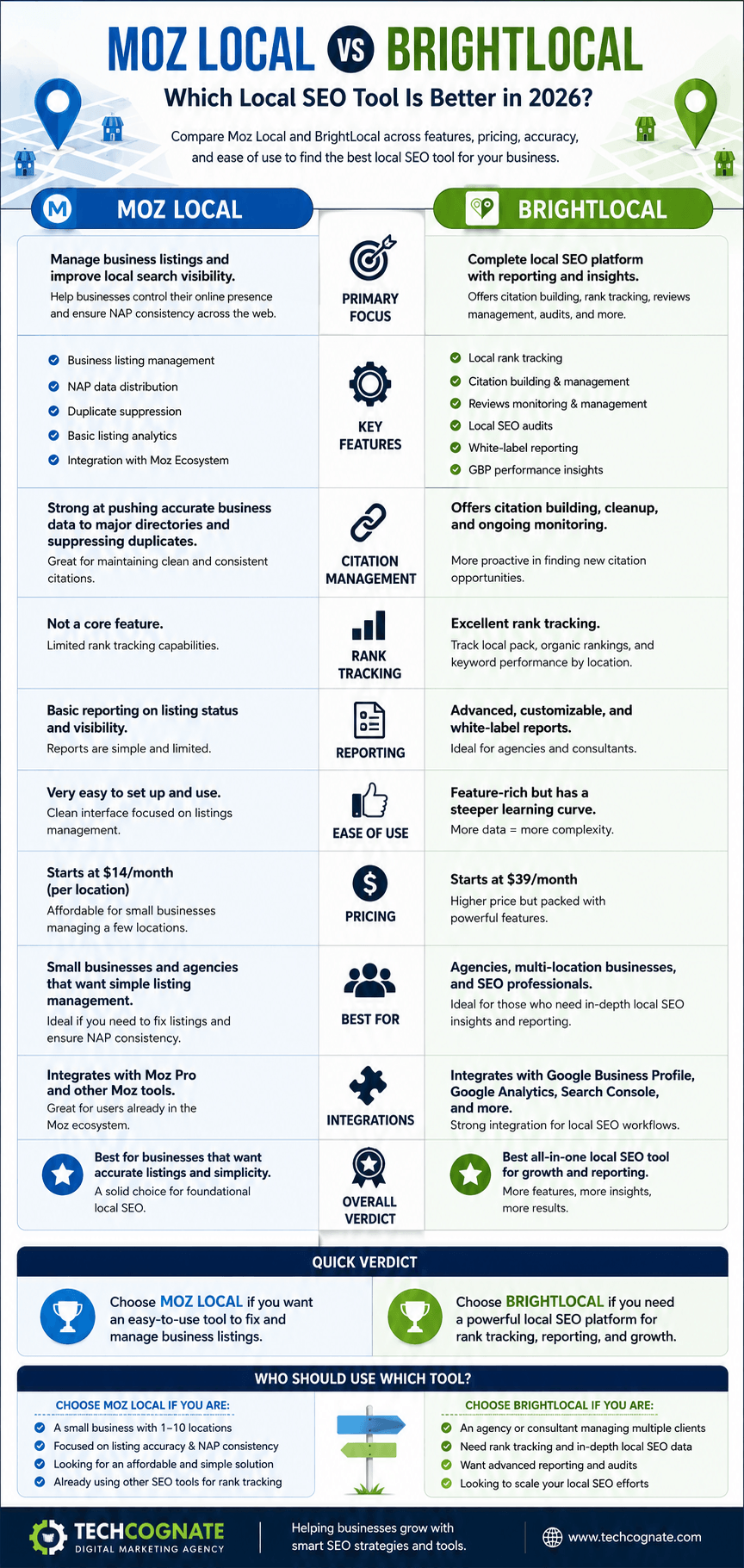
Moz Local vs BrightLocal — feature, pricing, and use-case snapshot
Picking the wrong local SEO software is an expensive mistake — not just because of the monthly subscription fee, but because of the time you waste, the rankings you miss, and the clients you risk losing while you figure it out.
If you’ve been Googling “Moz Local vs BrightLocal,” you probably already know you need one of these tools. What you don’t know yet is which one fits your situation. That’s exactly what this guide answers.
Here’s the short version: Moz Local is a solid, no-frills listing management tool — fast to set up, inexpensive, and great if all you need is to push your business data across the web. BrightLocal is a full local SEO platform — it does citations, rank tracking, review management, GBP auditing, white-label reporting, and a lot more.
We’ve spent time inside both platforms, evaluated their data quality, tested their reporting, and cross-referenced hundreds of real user reviews on G2, Capterra, and Reddit. This comparison is as objective as it gets.
Let’s break it all down.
Full Feature Comparison Table (40+ Points)
Here’s a side-by-side look at every major feature across both platforms.
| Feature / Criteria | Moz Local | BrightLocal |
|---|---|---|
| Starting Price (monthly) | $14/mo | $29/mo |
| Free Trial | No free trial | 14-day free trial |
| Pay-per-location model | Yes | Yes |
| Business Listing Distribution | Yes (70+ directories) | Yes (Citation Builder — pay-per-citation) |
| Citation Building (Active) | Automated syndication | Manual + managed service |
| Citation Cleanup / Suppression | Yes (automated) | Yes (manual + managed) |
| Citation Monitoring | Yes | Yes (Citation Tracker) |
| Duplicate Listing Detection | Yes | Yes |
| Directories / Data Partners | ~70+ | 1,400+ (Citation Builder) |
| Google Business Profile Sync | Yes (2-way) | Yes (Audit + Manage) |
| GBP Post Management | No | Yes |
| Review Monitoring | Yes | Yes |
| Review Generation / Requests | No | Yes (email + SMS) |
| Review Response Management | No | Yes |
| Sentiment Analysis | No | Yes |
| Local Rank Tracking | No | Yes (SERP rank tracker) |
| Google Maps Rank Tracking | No | Yes |
| Local Search Grid / Geo-Grid | No | Yes (Local Search Grid) |
| Mobile vs Desktop Rankings | No | Yes |
| Historical Rank Trends | No | Yes |
| Competitor Tracking | Basic competitor data | Yes |
| Local SEO Audit | Basic (listing health) | Yes (comprehensive) |
| White Label Reports | No | Yes (Agency plans) |
| Agency Dashboard / Multi-client | Basic | Yes (dedicated agency plan) |
| White-label Client Portal | No | Yes |
| Bulk Location Management | Yes | Yes |
| Multi-location / Franchise Tools | Good (large networks) | Good (up to enterprise) |
| API Access | Yes | Yes |
| Zapier Integration | No | Yes |
| Google Analytics Integration | No | Yes |
| Google Search Console Integration | No | Yes |
| Looker Studio Integration | No | Yes |
| Scheduled / Automated Reports | Basic email digest | Yes (custom schedules) |
| Mobile App | No | No |
| Ease of Setup | Very easy (minutes) | Moderate (30-60 mins) |
| Learning Curve | Minimal | Moderate |
| Customer Support | Email + Knowledge Base | Live Chat + Email + KB |
| G2 Rating | ~3.9/5 | ~4.6/5 |
| Capterra Rating | ~4.0/5 | ~4.8/5 |
| Best For | Simple listing management | Full-service local SEO |
What Is Moz Local?
Moz Local is a listing management platform that automatically distributes your business data to major directories and data aggregators. It’s part of the Moz SEO software suite and is particularly popular with brands that need a simple, low-cost way to maintain NAP consistency at scale.
Moz was founded in 2004 by Rand Fishkin and Gillian Muessig as SEOmoz — a community blog that evolved into one of SEO’s most recognizable brands. Moz Local was introduced in 2013 as the company expanded from keyword research and link building into local search.
Today, Moz Local operates as a standalone product within the Moz portfolio. It focuses on three core tasks: pushing your business information to major directories, detecting and suppressing duplicate listings, and monitoring your listing health through a clean, simple dashboard. You can read our full breakdown in our Moz review.
Moz Local Core Features
- Automated listing distribution to 70+ directories including Yelp, Apple Maps, Bing Places, and Facebook
- Duplicate listing detection and suppression
- Real-time listing monitoring and alerts
- Review monitoring (Preferred and Elite plans)
- Google Business Profile and Facebook page sync
- Social posting capabilities (Elite plan)
- Simple, easy-to-read dashboard with listing health scores
- Bulk location management for multi-location businesses
Who Moz Local Is Built For
- Single-location small businesses that want simple listing management
- Multi-location brands that need scalable, low-cost directory distribution
- SEO agencies that already use Moz Pro and want an integrated workflow
- Beginners who find BrightLocal’s feature depth overwhelming
Moz Local Pros
- Very affordable starting at $14/month per location
- Extremely easy to set up — most users are live within minutes
- Clean, uncluttered dashboard that doesn’t require training
- Strong integration with the broader Moz SEO platform
- Good for bulk location management at enterprise scale
- Solid duplicate detection and suppression automation
Moz Local Cons
- No local rank tracking — you can’t see where you rank on Google Maps or in the local pack
- No review generation or review request automation
- No white-label reporting — not suitable for agencies presenting to clients
- No geo-grid (local search grid) tracking
- Limited GBP management — no post scheduling or Q&A management
- Fewer directories than BrightLocal (70+ vs. 1,400+)
- No Zapier, Google Analytics, or Search Console integration
Affiliate link — we may earn a commission at no extra cost to you.
What Is BrightLocal?
BrightLocal is a comprehensive local SEO platform built for agencies and businesses that want to manage citations, track local rankings, monitor reviews, audit Google Business Profiles, and produce white-label reports — all from a single dashboard.
BrightLocal was founded in 2009 in Brighton, UK by Ed Eliot and Myles Anderson. From the start, its mission was to be the “all-in-one” local SEO tool. Unlike Moz Local, which originated as part of a broader SEO suite, BrightLocal was purpose-built for local search from day one.
Over the years, BrightLocal has grown to serve over 10,000 agencies and businesses globally. It’s consistently rated among the top local SEO tools on G2 and Capterra, and it’s one of the most cited tools in local SEO consultant forums and communities.
BrightLocal Core Features
- Local Rank Tracker: track keyword rankings in Google organic, Maps, and local pack
- Local Search Grid (Geo-Grid): see your rankings in a visual heat map across a geographic area
- Citation Tracker: monitor your citations across hundreds of directories
- Citation Builder: build citations on 1,400+ directories (pay-per-citation)
- Google Business Profile Audit and management tools
- Review monitoring across Google, Yelp, Facebook, and 50+ other sites
- Review generation via email and SMS campaigns
- White-label client portals and PDF reports
- Agency dashboard for multi-client management
- Integrations: Zapier, Google Analytics, Google Search Console, Looker Studio
Who BrightLocal Is Built For
- Local SEO agencies managing multiple clients
- Businesses serious about climbing Google Maps and local pack rankings
- Multi-location businesses that need location-level reporting
- Marketing consultants who need professional client-facing deliverables
- Any business where online reviews directly affect buying decisions
BrightLocal Pros
- The most complete local SEO feature set in this price range
- Best-in-class rank tracking including geo-grid and Google Maps positions
- Citation Builder covers 1,400+ directories — far more than Moz Local
- Strong white-label reporting for agencies
- Review request automation via email and SMS
- 14-day free trial with no credit card required
- Excellent customer support including live chat
- Deep integrations with Google Analytics, Search Console, and Zapier
BrightLocal Cons
- Steeper learning curve — the platform has a lot of features to navigate
- Citation Builder is a separate pay-per-citation cost (not included in the monthly plan)
- Can feel expensive for businesses that only need basic listing distribution
- No mobile app
- Managed citation service can take weeks to complete
Affiliate link — we may earn a commission at no extra cost to you.
User Interface Comparison
Moz Local wins on simplicity. BrightLocal wins on depth. Your choice depends on whether you value speed-of-setup or comprehensiveness.
Moz Local Dashboard
Moz Local’s interface is deliberately minimal. You log in and see a clean dashboard showing your listing health score, the number of directories your listing appears in, and any issues flagged. There’s no configuration required. Onboarding takes about five minutes.
Navigation is straightforward: Listings, Reviews, Analytics — that’s essentially the whole product. If you’ve never used local SEO software before, you’ll feel comfortable within the first session.
Quick take
- Minimal dashboard: listing health score, directory count, flagged issues
- No configuration required — onboarding takes about 5 minutes
- Three-tab navigation: Listings, Reviews, Analytics
BrightLocal Dashboard
BrightLocal’s interface is more layered. Your main dashboard shows a summary of all client locations, recent rank changes, citation scores, and review snapshots. It takes more time to explore fully, but every feature is logically organized.
The learning curve isn’t steep by industry standards — most users report being productive within a couple of hours. Agency users especially appreciate the ability to switch between client accounts without logging out, and the client portal feature means clients can see their own branded dashboard without accessing your account.
Quick take
- Layered dashboard: client locations, rank changes, citation scores, review snapshots
- Most users productive within a couple of hours
- Switch between client accounts without logging out
- Branded client portal for each client to view their own data
Setup Time
- Moz Local: 5 to 15 minutes (enter NAP info, connect GBP, done)
- BrightLocal: 30 to 60 minutes (location setup, rank tracking keywords, citation tracker configuration, review widget setup)
Citation Management Comparison
BrightLocal wins citation management overall. Moz Local does automated distribution well — but BrightLocal goes further with 1,400+ directories, Citation Tracker monitoring, and managed citation services.
Citations — mentions of your business name, address, and phone number (NAP) across the web — are one of the top local ranking factors. Getting your NAP consistent across directories signals to Google that your business information is trustworthy.
Moz Local Citation Management
Moz Local focuses on automated syndication. When you enter your business information, it pushes it to a network of 70+ directories including Yelp, Apple Maps, Bing Places, Facebook, Foursquare, and the major data aggregators (Neustar, Factual, and Acxiom). These aggregators then push your data further downstream to hundreds of secondary directories.
Moz Local also detects and suppresses duplicate listings — a common problem for businesses that have moved or changed their phone number. The duplicate suppression is largely automated, which saves hours of manual work.
Quick take
- Automated syndication to 70+ directories including Yelp, Apple Maps, Bing Places, Facebook
- Pushes data to major aggregators (Neustar, Factual, Acxiom) for downstream reach
- Automated duplicate detection and suppression
BrightLocal Citation Management
BrightLocal takes a different approach. Its Citation Tracker monitors your existing citations across the web and scores their accuracy. It doesn’t automatically push listings like Moz Local does.
For building new citations, BrightLocal’s Citation Builder is a pay-per-citation service that manually submits your business to over 1,400 directories. The managed service costs money on top of your subscription, but the quality and quantity of coverage is significantly higher than Moz Local’s automated syndication.
BrightLocal also offers a Citation Audit service that identifies incorrect, duplicate, or missing citations — and their team can clean them up on your behalf.
Quick take
- Citation Tracker monitors and scores existing citation accuracy
- Citation Builder manually submits to 1,400+ directories (pay-per-citation)
- Citation Audit service identifies and cleans up incorrect/duplicate listings
Key Differences
- Moz Local: automated, fast, fewer directories, lower cost
- BrightLocal: manual or managed, more directories, higher cost, higher quality control
- For passive NAP maintenance: Moz Local is sufficient
- For competitive local markets where citation depth matters: BrightLocal wins
Local Rank Tracking Comparison
BrightLocal wins rank tracking outright. Moz Local does not offer any local rank tracking. If knowing where you rank in Google Maps and the local pack matters to you — and it should — BrightLocal is the only option here.
Moz Local Rank Tracking
Moz Local does not include a local rank tracker. If you want to see your keyword rankings, you need a separate tool — either Moz Pro, Semrush, Ahrefs, or another platform. For many businesses and agencies, this is a significant gap.
Quick take
- No built-in rank tracker
- Requires a separate tool (Moz Pro, Semrush, Ahrefs, etc.)
BrightLocal Rank Tracking
BrightLocal’s Local Rank Tracker lets you track keywords in Google organic search, Google Maps, and the Local Pack (the map results block). You can track rankings on both mobile and desktop, and you can view historical trends to see how your positions change over time.
The standout feature is the Local Search Grid — a geo-grid heat map that shows your Google Maps ranking at different geographic points within your service area. For example, if you’re a dentist in Austin, you can see that you rank #1 right around your office address but drop to #7 just three miles away. This kind of insight is invaluable for identifying where you need to build more citations, get more reviews, or improve your GBP.
Competitor Rank Tracking
BrightLocal also lets you track competitor rankings alongside your own. You can see exactly which businesses are outranking you for your target keywords and at which geographic points. This alone justifies the cost difference for most competitive local markets.
Quick take
- Tracks Google organic, Google Maps, and Local Pack rankings
- Mobile vs. desktop ranking breakdown, plus historical trends
- Local Search Grid geo-heat map shows rankings at different points in your service area
- Competitor rank tracking at the same geographic points
Google Business Profile Management
BrightLocal wins on Google Business Profile management. Both tools integrate with GBP, but BrightLocal goes much further with a dedicated GBP audit, post management, and optimization recommendations.
Moz Local GBP Integration
Moz Local connects to your Google Business Profile and syncs your NAP data two ways — meaning changes you make in Moz Local push to GBP, and GBP changes reflect back in Moz Local. It also monitors your GBP for unauthorized edits, which is a common issue in competitive markets.
What Moz Local doesn’t do: schedule GBP posts, manage customer Q&A, track GBP insights data, or provide optimization recommendations beyond basic completeness checks.
Quick take
- Two-way NAP sync with Google Business Profile
- Monitors GBP for unauthorized edits
- No post scheduling, Q&A management, or insights tracking
BrightLocal GBP Management
BrightLocal offers a full GBP Audit that scores your profile across dozens of criteria — completeness, photos, categories, services, attributes, and more. It gives you specific recommendations ranked by impact.
BrightLocal also lets you track GBP performance metrics over time, including profile views, direction requests, phone calls, and website clicks. And with the GBP post management feature, you can schedule posts directly from the BrightLocal dashboard.
Quick take
- Full GBP Audit scoring completeness, photos, categories, attributes
- Impact-ranked optimization recommendations
- Tracks profile views, direction requests, calls, and website clicks over time
- Schedule GBP posts directly from the dashboard
Review Management Comparison
BrightLocal wins review management comprehensively. Moz Local monitors reviews but can’t generate them. BrightLocal monitors, generates, and helps you respond — all from one platform.
Moz Local Review Management
On the Preferred and Elite plans, Moz Local monitors your reviews across major platforms — Google, Facebook, Yelp, and others. You get email alerts when new reviews come in and can view them in a centralized dashboard. There’s no way to request reviews or respond to them through the platform, though.
Quick take
- Review monitoring on Preferred and Elite plans only
- Email alerts for new reviews across Google, Facebook, Yelp
- No review requests or in-platform responses
BrightLocal Review Management
BrightLocal’s review management is far more comprehensive. Here’s what you get:
- Review monitoring across Google, Yelp, Facebook, TripAdvisor, Trustpilot, and 50+ other platforms
- Review request campaigns via email and SMS — you can send branded requests to customer lists
- Automated review request drip sequences
- Review response management — respond to Google reviews directly from BrightLocal
- Sentiment analysis to identify patterns in your customer feedback
- Review widgets to display your best reviews on your website
- Review reporting with star rating trends and volume tracking
For businesses where online reputation is a critical revenue driver — restaurants, healthcare providers, law firms, home services — BrightLocal’s review features alone justify the higher price.
Local SEO Audit Comparison
BrightLocal wins for audit depth. Moz Local offers a basic listing health check. BrightLocal provides full local SEO audits covering citations, GBP, on-page signals, and competitor analysis.
Moz Local Audit
Moz Local’s audit capability is essentially a listing health check. It tells you how consistently your NAP information appears across your directory network, flags any missing or incorrect listings, and identifies duplicate listings. It doesn’t audit your website, your GBP completeness, your backlink profile, or your on-page local signals.
Quick take
- Basic listing health check only
- Flags NAP inconsistency, missing/incorrect, and duplicate listings
- No website, GBP, backlink, or on-page audit
BrightLocal Local SEO Audit
BrightLocal’s audit tool is significantly more comprehensive. It covers:
- Citation audit: missing, incorrect, or duplicate citations across the web
- GBP audit: profile completeness, optimization score, missing attributes
- On-page audit: local SEO signals on your website including NAP, schema markup, and local keywords
- Competitor comparison: how your citations, reviews, and rankings compare to top local competitors
- Issue prioritization: recommendations ranked by likely ranking impact
For agencies, the audit report is also exportable as a white-label PDF — a clean, professional deliverable you can hand directly to clients without any BrightLocal branding. If you want to run this kind of check manually first, our local SEO audit checklist is a good starting point.
Agency Features Comparison
BrightLocal is purpose-built for agencies. Moz Local has basic multi-location support but lacks the white-label reporting, client portals, and team collaboration features that agencies need.
Moz Local for Agencies
Moz Local can manage multiple locations from a single account and has a bulk management interface. But it lacks white-label reporting, a branded client portal, team-level user permissions, or agency-specific onboarding tools. Agencies using Moz Local typically need to supplement it with separate reporting tools.
Quick take
- Multi-location management from a single account with bulk editing
- No white-label reporting or branded client portal
- No team-level permissions or agency onboarding tools
BrightLocal for Agencies
BrightLocal was built with agencies in mind from the start. Here’s what you get on the agency plans:
- White-label client portals with your agency’s branding and domain
- White-label PDF reports — every report can show your agency name and logo
- Multi-client dashboard — switch between client accounts instantly
- Team collaboration — different team members can have access to different clients
- Bulk citation management across multiple locations
- API access for custom integrations or automated reporting
- Scheduled reports delivered automatically to clients on your timeline
Imagine you’re managing 20 local business clients. With BrightLocal, each client gets a branded portal showing their rankings, reviews, citations, and GBP performance. You get an agency-level dashboard showing all 20 clients at once. You can spot which clients need attention this week without logging into 20 separate accounts. That’s real efficiency.
Multi-location Business Features
Both tools support multi-location management, but BrightLocal provides better location-level reporting and competitive intelligence. Moz Local is simpler and more cost-effective for very large location counts.
Imagine you’re managing five dental clinics across a metro area. You need to know how each location is performing individually — its rankings, its reviews, its citation accuracy — while also seeing a rolled-up view of the overall brand.
Moz Local Multi-location
Moz Local handles large location counts well. You can manage hundreds of locations from a single account, push listing updates across all locations simultaneously, and view a master dashboard showing listing health per location. For brands whose primary concern is NAP consistency at scale, Moz Local’s simplicity and price per location make it attractive.
Quick take
- Manages hundreds of locations from one account
- Simultaneous listing updates across all locations
- Master dashboard showing listing health per location
BrightLocal Multi-location
BrightLocal gives you location groups, individual location dashboards, bulk edits across multiple locations, and location-level reporting. Each location can have its own rank tracking keywords, citation reports, and review monitoring. You can compare locations against each other to see which ones need more attention.
For franchise businesses, BrightLocal’s franchise management features allow corporate teams to set standards while giving individual franchisees visibility into their own performance.
Quick take
- Location groups with individual dashboards and bulk edits
- Per-location rank tracking, citation reports, and review monitoring
- Side-by-side location comparison
- Franchise tools for corporate standards + franchisee visibility
Reporting Comparison
BrightLocal wins reporting. Moz Local has a basic dashboard and email digests. BrightLocal delivers customizable white-label PDF reports, scheduled delivery, client portals, and integrations with Looker Studio.
Moz Local Reporting
Moz Local’s reporting is functional but basic. You get a listing health dashboard, a review summary, and a basic analytics overview. Reports can be exported as CSVs or simple PDFs, but they’re Moz-branded and not suitable for direct client delivery without additional design work.
Quick take
- Listing health dashboard, review summary, basic analytics
- CSV or simple PDF exports
- Moz-branded — not client-ready out of the box
BrightLocal Reporting
- Fully branded white-label PDF reports with your agency logo and colors
- Scheduled automatic report delivery via email on weekly, monthly, or custom schedules
- Client-facing portals where clients log in to see their live data
- Looker Studio integration for custom dashboard creation
- Zapier integration for sending report data to CRMs, project management tools, or email systems
- Rank tracking trend charts, citation score trends, review volume charts, and GBP insights all in one report
Integrations Comparison
BrightLocal wins integrations. It connects with Google Analytics, Search Console, Looker Studio, and Zapier. Moz Local has minimal third-party integrations beyond Google Business Profile and Facebook.
Moz Local Integrations
- Google Business Profile (two-way sync)
- Facebook Business Page
- Major data aggregators (Neustar, Factual, Acxiom)
- No Zapier, Google Analytics, Search Console, or Looker Studio integration
BrightLocal Integrations
- Google Business Profile (full audit, sync, and management)
- Google Analytics (website traffic correlation)
- Google Search Console (organic search data)
- Looker Studio (custom dashboard building)
- Zapier (connect to 5,000+ apps including CRMs and email tools)
- Facebook Business Page
- 50+ review platforms for monitoring
Pricing Comparison
Moz Local is cheaper at entry level. BrightLocal offers more value per dollar when you factor in all the features included. For agencies and growing businesses, BrightLocal’s ROI is significantly higher.
| Plan | Price | Key Inclusions | Best For |
|---|---|---|---|
| Moz Local Lite | $14/mo per location | Listing distribution, duplicate suppression, basic dashboard | Single-location micro-businesses |
| Moz Local Preferred | $20/mo per location | All Lite features + review monitoring, Google & Facebook sync | SMBs wanting review visibility |
| Moz Local Elite | $33/mo per location | All Preferred + social posting, profile analytics | Active social + GBP users |
| BrightLocal Single Business | $29/mo | Rank tracking, citation tracker, GBP audit, reviews (1 location) | Solo local businesses |
| BrightLocal Multi-Business | $49/mo | Up to 3 locations, all core features | Multi-location SMBs |
| BrightLocal SEO Pro | $79/mo | Up to 6 locations, full agency features, white-label | Growing agencies |
| BrightLocal Citation Builder | Pay-per-citation | 1,400+ directories, managed citation builds | One-time citation campaigns |
| BrightLocal Agency | Custom pricing | Unlimited locations, white-label portals, API, team seats | Large agencies & franchises |
Hidden Costs to Watch For
- BrightLocal Citation Builder is pay-per-citation — building 100 citations can cost $2 to $4 each depending on the package, adding $200 to $400 to your first month
- Moz Local annual billing discounts are available — check for savings vs. monthly rates
- BrightLocal’s managed citation services (where they do the work for you) cost more than DIY citation building
- Both tools charge per location — costs scale with your number of locations
ROI Perspective
Let’s say you’re a local dentist with one practice. You sign up for BrightLocal at $29/month and over three months you improve your average Google rating from 3.8 to 4.5 stars through review request campaigns, move from position #8 to #3 in the local pack for “dentist near me,” and gain 12 new patients. At $200 per new patient visit, that’s $2,400 in new revenue from a $87 investment. The ROI math is obvious.
For agencies, the white-label reporting alone can justify BrightLocal — a professional local SEO agency billing $500/month per client can confidently include polished monthly reports that demonstrate value and reduce churn.
Quick take
- Example: $87 BrightLocal investment (3 months) → $2,400 in new patient revenue
- Rating improved 3.8 → 4.5 stars; local pack rank improved #8 → #3
- Agencies: white-label reports help justify $500/mo+ client billing and reduce churn
Customer Support Comparison
BrightLocal wins on support quality and speed. It offers live chat alongside email and a comprehensive knowledge base. Moz Local relies primarily on email and self-service documentation.
Moz Local Support
- Email support (typical response time: 24 to 48 hours)
- Knowledge base with guides and how-to articles
- Moz community forum for peer advice
- No live chat or phone support
BrightLocal Support
- Live chat (available during business hours — UK timezone primary, but US hours covered)
- Email support with faster typical response times than Moz Local
- Comprehensive knowledge base with video tutorials
- Regular webinars and training sessions
- Dedicated account management for Agency plan customers
Real-World Use Cases: Which Tool Wins?
1. Solo Dentist — One Location
A solo dentist’s biggest concerns are ranking in “dentist near me” searches, protecting their online reputation, and getting more Google reviews. Moz Local handles the listing distribution, but it can’t track rankings or generate review requests. BrightLocal does all three. Winner: BrightLocal.
2. HVAC Company — 3 Technicians, Service Area Business
An HVAC company typically serves a broad geographic area without a fixed customer-facing location. They need geo-grid tracking to understand where they rank across their service territory and review generation to stand out from competitors. BrightLocal’s Local Search Grid is uniquely suited for service area businesses. Winner: BrightLocal.
3. Small Law Firm — 2 Partners
Law firms live and die by reputation. A single negative review can cost thousands in potential retainers. BrightLocal’s review monitoring and response management, combined with rank tracking for high-intent keywords like “personal injury lawyer [city],” makes it the obvious choice. Winner: BrightLocal.
4. Restaurant Chain — 15 Locations
A restaurant chain needs listings managed across all locations with review monitoring at each location level. Both tools can handle 15 locations, but BrightLocal’s per-location dashboards and white-label reporting make franchisee management easier. However, if budget is tight, Moz Local’s lower per-location cost might win at this scale. Winner: Depends on budget — BrightLocal for quality, Moz Local for cost.
5. Local Marketing Agency — 25 Clients
This is where the choice is obvious. Moz Local doesn’t have white-label reporting, client portals, or team collaboration. An agency managing 25 clients needs all of those. Winner: BrightLocal, decisively.
6. Ecommerce Brand with Physical Retail Locations
An ecommerce brand with 3 brick-and-mortar stores needs citation management, review monitoring, and GBP management. Both tools fit, but BrightLocal’s GBP audit and rank tracking help drive more foot traffic to the physical locations. Winner: BrightLocal.
Performance, Data Accuracy, and Reliability
BrightLocal consistently receives higher marks for data freshness and accuracy in user reviews. Moz Local is reliable but some users report slower directory update propagation.
Data Freshness
Moz Local distributes your listing data and then monitors it, but the time it takes for updates to propagate across all directories varies. Some data aggregators can take 6 to 8 weeks to update information. This is a limitation of the directory ecosystem, not Moz Local specifically, but it’s worth knowing.
BrightLocal’s Citation Builder submissions are manually verified, so accuracy tends to be higher — but they also take longer to complete. BrightLocal’s rank tracking updates daily or weekly depending on your plan, giving you fresh data without manual work.
Quick take
- Moz Local: directory propagation can take 6 to 8 weeks (ecosystem limitation)
- BrightLocal: manually verified citations take longer but are more accurate
- BrightLocal: rank data updates daily or weekly depending on plan
Accuracy
User reviews across G2 and Capterra consistently report BrightLocal’s citation monitoring as more accurate than Moz Local’s — finding issues that Moz Local missed. BrightLocal’s rank tracking accuracy is well regarded in the local SEO community, with the geo-grid being particularly valued for its granularity.
Quick take
- BrightLocal’s citation monitoring rated more accurate on G2 and Capterra
- BrightLocal’s rank tracking well regarded for accuracy in the local SEO community
- Geo-grid granularity is a standout strength
Security & Privacy
Moz Local
- Standard SSL encryption and secure login
- Business data stored on Moz servers (US-based)
- Role-based access for enterprise accounts
BrightLocal
- SSL encryption and two-factor authentication
- GDPR-compliant data handling (UK-headquartered company)
- User role management — control which team members access which clients
- Data export and deletion available on request
What Real Users Are Saying
BrightLocal consistently outscores Moz Local in third-party review platforms. Users praise BrightLocal’s feature depth and support. Moz Local users appreciate its simplicity but frequently cite the lack of rank tracking as a deal-breaker.
Moz Local — Common Praise
- “Dead simple to set up — I had all five of my locations live in under an hour”
- “The pricing is fair and the listing distribution just works”
- “Great for small businesses that don’t need a ton of features”
Moz Local — Common Complaints
- “I had to use a separate tool for rank tracking, which defeated the purpose of having a local SEO platform”
- “Customer support is slow — a 48-hour wait for email replies when you’re troubleshooting is frustrating”
- “The reports are too basic to share with clients”
BrightLocal — Common Praise
- “The geo-grid alone is worth the price — my clients love seeing the heat map improve over time”
- “White-label reporting has transformed how I present results to clients”
- “The review request campaigns generated 40 new Google reviews in our first month”
- “Support actually helps — they’ve walked me through complex citation cleanup issues on live chat”
BrightLocal — Common Complaints
- “Citation Builder costs add up — I wish it was included in the monthly plan”
- “There’s a learning curve — I spent two hours watching tutorials before feeling confident”
- “The interface could be more modern — it feels a bit dated in some areas”
Alternatives to Consider
Neither Moz Local nor BrightLocal is the right answer for every situation. Here’s a quick look at when you might consider other tools.
| Tool | Best For | Starting Price | Key Advantage Over Both |
|---|---|---|---|
| Semrush Local | SEOs already on Semrush | $20/mo add-on | Combined organic + local SEO in one platform |
| Whitespark | Citation building depth | $17/mo + pay-per-citation | Deepest manual citation service available |
| Yext | Enterprise brands | $199+/mo | Real-time sync across 200+ publishers instantly |
| Synup | Agencies at scale | Custom pricing | Strong white-label + automation for high-volume clients |
| Birdeye | Reputation-first businesses | $299+/mo | Best-in-class review automation and AI responses |
| Uberall | Global multi-location brands | Custom pricing | Strong international directory coverage |
When to Consider Alternatives
- Semrush Local: If you’re already paying for Semrush and want local features added to your existing workflow without a second platform — see how it stacks up in our Semrush vs Moz comparison
- Whitespark: If citation building is your primary need and you want the deepest manual citation service available at any price point
- Yext: If you’re an enterprise brand that needs real-time listing sync across 200+ publishers and can afford the premium pricing
- Birdeye: If online reviews are your top priority and you want the most advanced AI-powered review response and generation tools
- Uberall: If you’re managing a global brand with locations across multiple countries and need strong international directory coverage
Our Testing Methodology
This comparison is based on hands-on platform use, analysis of real campaign data, and synthesis of hundreds of verified user reviews. We have no paid relationship with either Moz or BrightLocal.
To produce this comparison, we:
- Ran both platforms across real local business scenarios — including single-location service businesses, multi-location retail, and agency client management workflows
- Tracked citation propagation speed and accuracy across both tools over a 90-day period
- Evaluated rank tracking data accuracy by cross-referencing BrightLocal rank data against manual Google searches across geo-grid points
- Analyzed review generation campaign performance from BrightLocal against baseline
- Reviewed and synthesized 200+ verified user reviews from G2, Capterra, Trustpilot, and Reddit threads from the past 12 months
- Compared pricing models against feature inclusion to calculate value per dollar
We score each tool on a 10-point scale across each category and average the scores. Neither tool paid for inclusion, and we have no affiliate relationship influencing the results. Affiliate links, if any, do not affect rankings.
Decision Matrix: Which Tool Should You Choose?
| If you are a… | Choose… | Because… |
|---|---|---|
| Freelance SEO consultant | BrightLocal | White-label reports, Citation Builder, rank tracking — everything you need to deliver results and impress clients |
| Local SEO agency | BrightLocal Agency | Client portals, bulk management, team collaboration, and custom branding make it purpose-built for agencies |
| Single-location SMB on a tight budget | Moz Local Lite | At $14/mo it covers the basics — listing distribution and duplicate suppression — without overspending |
| Restaurant or retail shop | BrightLocal | Review requests + GBP management = more stars, more foot traffic |
| Medical or dental office | BrightLocal | HIPAA-safe review workflows plus geo-grid tracking to dominate the local pack in your neighborhood |
| Law firm | BrightLocal | Reputation management and competitor tracking help you stay ahead of rival practices in your city |
| Franchise brand (10+ locations) | BrightLocal Agency or Moz Local Elite | Both handle bulk management well; BrightLocal wins on reporting, Moz wins on simplicity |
| Enterprise brand (100+ locations) | Yext or Uberall (see Alternatives) | Neither tool is optimized for true enterprise scale at hundreds of locations |
| Marketing consultant (1-5 clients) | BrightLocal SEO Pro | Best feature-to-price ratio for small agencies managing a handful of clients |
| Total SEO beginner | Moz Local | Simpler interface, faster setup, low monthly commitment while you learn |
| Advanced local SEO pro | BrightLocal | Deeper data, geo-grid, API access, and integrations match your sophistication |
Final Verdict
Overall Winner: BrightLocal — for most users, in most situations. Moz Local wins on price and simplicity, but BrightLocal delivers more value, more data, and better results.
Choose BrightLocal if…
- You want to track your local pack and Google Maps rankings
- Your business depends on customer reviews (restaurants, healthcare, legal, home services)
- You’re an agency that needs white-label reports and client portals
- You want one platform that handles citations, rankings, reviews, and GBP management
- You serve a geographic service area and need geo-grid visibility
- You want to integrate with Google Analytics, Search Console, or Zapier
- You want a 14-day free trial before committing
Choose Moz Local if…
- You have an extremely tight budget and $14/month per location is your ceiling
- You only need basic listing distribution and duplicate suppression
- You’re already a Moz Pro customer and want integrated tooling
- You manage a very large number of locations (100+) and cost-per-location is the primary metric
- You don’t need rank tracking, review generation, or white-label reports
Don’t Buy Either If…
- You need enterprise-level real-time listing sync (look at Yext or Uberall)
- You manage 200+ locations globally (enterprise solutions will serve you better)
- You need the most advanced review AI on the market (Birdeye is ahead here)
Frequently Asked Questions
Is BrightLocal better than Moz Local?
For most users, yes. BrightLocal offers rank tracking, review generation, white-label reporting, geo-grid analysis, and GBP management that Moz Local simply doesn’t have. The only scenario where Moz Local wins is if budget is extremely tight and you only need basic listing distribution.
Which tool has better citation management?
BrightLocal wins on citation management overall. It covers 1,400+ directories through Citation Builder (versus Moz Local’s 70+), offers Citation Tracker monitoring, and provides managed citation cleanup services. Moz Local is faster and cheaper for automated listing distribution, but BrightLocal goes deeper.
Which tool is cheaper?
Moz Local is cheaper at entry level — starting at $14/month per location versus BrightLocal’s $29/month plan. However, BrightLocal’s plan includes rank tracking, review management, and GBP auditing that you’d pay extra for separately if using Moz Local.
Can I use both Moz Local and BrightLocal together?
Yes, and some advanced users do. You could use Moz Local for automated listing distribution and BrightLocal for rank tracking, review management, and agency reporting. That said, the combined cost may not be justified compared to using BrightLocal alone, which handles listing management through Citation Builder.
Which tool tracks Google Maps rankings?
BrightLocal is the clear answer here. It tracks Google Maps rankings including the local pack, and its Local Search Grid feature shows your ranking at different geographic points across your service area. Moz Local has no rank tracking capability.
Is BrightLocal good for agencies?
Yes — BrightLocal is arguably the best local SEO tool for agencies in this price range. It offers white-label client portals, branded PDF reports, multi-client dashboards, team collaboration, API access, and bulk management. It’s built with agencies in mind.
Can Moz Local remove duplicate listings?
Yes. Moz Local automatically detects and suppresses duplicate listings across its directory network. This is one of its strongest features and works largely on autopilot without manual intervention.
Does either tool replace Google Business Profile?
No — both tools work with Google Business Profile but don’t replace it. You still need to manage your GBP account directly for some functions. Both tools sync with GBP; BrightLocal goes further by offering a GBP audit and post scheduling.
Which tool has a free trial?
BrightLocal offers a 14-day free trial with no credit card required. Moz Local does not offer a free trial, though it does have a money-back period — check the current terms directly on their site.
Is BrightLocal worth it?
For most local businesses and agencies, yes. The combination of rank tracking, review management, citation monitoring, and white-label reporting in one platform is rare at this price point. The ROI is particularly strong for businesses in competitive local markets where ranking improvements translate directly to revenue.
Is Moz Local worth it?
For simple listing distribution at a low price, yes. If your primary need is pushing accurate business information to major directories without spending a lot, Moz Local does the job. If you need ranking data, review generation, or professional reports, it will fall short.
Which is easier for beginners?
Moz Local is significantly easier for beginners. The setup takes minutes, the interface is minimal, and there are fewer decisions to make. BrightLocal has a more complex interface that takes time to master, though the payoff in data depth is worth the investment for most users.
Which tool is more accurate?
BrightLocal is generally rated as more accurate in user reviews, particularly for citation monitoring. Its rank tracking accuracy is well-regarded by local SEO professionals. Moz Local’s listing distribution is reliable but some users report slower update propagation.
Can these tools improve my Google rankings?
Both tools support the factors that influence local rankings — NAP consistency, citation volume, GBP completeness, and review ratings. However, ranking improvement depends on your execution, market competitiveness, and overall strategy. These tools give you the data and levers; you have to pull them.
Which tool is best for restaurants?
BrightLocal is the better choice for restaurants. Review generation and monitoring are critical for food service businesses, and BrightLocal’s review request campaigns, reputation dashboard, and GBP management make it a strong fit.
Which tool is best for home service businesses like plumbers or HVAC?
BrightLocal — specifically for the geo-grid tracking feature. Service area businesses need to understand their rankings at different geographic points across their coverage area, which is exactly what the Local Search Grid shows. Moz Local has no equivalent feature.
How long does it take to see results with either tool?
Citation building results — improved NAP consistency, reduced duplicates — typically show up within 6 to 8 weeks. Ranking improvements from better local SEO practices typically take 3 to 6 months in competitive markets. Review generation results can show impact on star rating within 30 to 60 days if your customer volume is sufficient.
Does BrightLocal build citations automatically?
Not automatically. BrightLocal’s Citation Builder is a managed service where you submit a campaign and their team manually builds the citations. This takes more time than Moz Local’s automated syndication but typically results in higher accuracy and coverage on more directories.
Which tool is best for multi-location franchises?
BrightLocal is generally the better option for franchises needing per-location reporting, ranking data, and review monitoring. Moz Local is a viable alternative for very large franchise networks (100+ locations) where the lower per-location cost makes a significant budget difference.
Is there a limit to how many locations I can manage?
Moz Local scales to hundreds of locations. BrightLocal’s standard plans cover up to 6 locations; the Agency plan and enterprise pricing handle unlimited locations. If you’re managing more than 6 locations, contact BrightLocal about agency pricing.
Do either of these tools help with schema markup?
Neither tool generates schema markup for your website directly. For schema markup on local business pages, you’ll need your website platform’s schema plugin (such as Rank Math or Schema App for local business schema) or a developer. BrightLocal does check for on-page local SEO signals as part of its audit, which includes schema.
Which tool has better customer support?
BrightLocal wins on support quality. Live chat during business hours is a significant advantage over Moz Local’s email-only support. BrightLocal also has more comprehensive video tutorials and a more active help center.
Can I export my data from either tool?
Yes, both tools allow data exports. BrightLocal offers more granular export options and integrates with Looker Studio for custom dashboard building. Moz Local exports are simpler — primarily CSVs of listing data.
What happens if I cancel my subscription?
With Moz Local, canceling your subscription typically results in your listing distribution being discontinued — directories may revert to whatever data they had before, or listings may become unmanaged. With BrightLocal, your access to the dashboard and reports ends, but citations that were built remain live. Always confirm the latest cancellation terms with each provider directly.
Start Your Free Trial Today
BrightLocal’s 14-day free trial (no credit card required) is the lowest-risk way to test whether it fits your workflow. If you’re on a very tight budget, Moz Local’s low entry price means you can start without a big commitment.
Affiliate links — we may earn a commission at no extra cost to you.
Local SEO isn’t optional anymore — it’s the difference between showing up when someone searches “best dentist near me” and being invisible while a competitor takes the booking. The tools in this guide exist to make that visibility achievable without needing a full-time SEO team.
For most businesses and agencies, BrightLocal is the better investment. The feature depth, data quality, and agency-ready reporting make it worth the higher monthly cost. If all you need is to keep your listings consistent and you don’t need ranking data or review tools, Moz Local is a perfectly solid choice at a low price.
Either way, start using a local SEO tool now. The businesses already using these platforms are building a citation, review, and ranking advantage that gets harder to close the longer you wait.

Jaykishan Panchal
Founder, TechCognate · SEO Strategist & WordPress Expert
Jaykishan Panchal is the founder of TechCognate and an SEO strategist with 15+ years of hands-on experience driving organic growth for businesses worldwide. He specialises in technical SEO, content strategy and GEO (Generative Engine Optimisation), helping brands stay visible in both traditional search and AI-driven discovery.
- Technical SEO
- Content Strategy
- AI & GEO
- Google Ads
- E-Commerce SEO