Ahrefs vs KWFinder (2025): Which SEO Tool Is Actually Worth Your Money?
An honest, hands-on comparison built from hundreds of real keyword research projects — not a rehashed feature checklist.
Choosing the wrong SEO tool can cost you hundreds of dollars a year — and even worse, it can lead you toward the wrong keywords entirely.
Most people comparing Ahrefs and KWFinder aren’t looking for another feature checklist. They want to answer one honest question: which one is actually worth paying for?
We’ve used both tools across hundreds of keyword research projects — from affiliate websites and local businesses to ecommerce stores and SaaS companies. Here’s what actually matters.
This guide compares everything that matters:
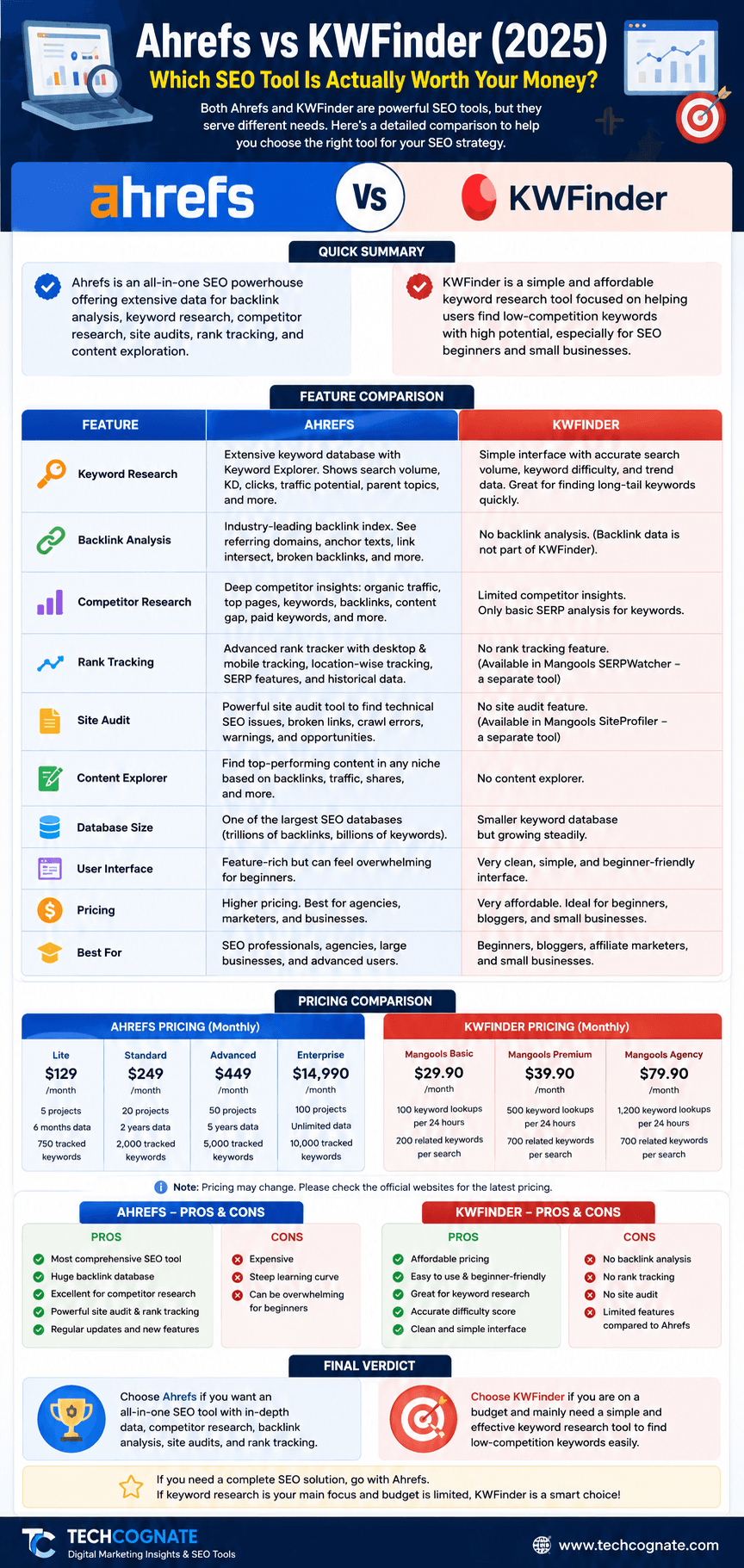
At-a-Glance Comparison: Ahrefs vs KWFinder
| Feature | Ahrefs | KWFinder | Winner |
|---|---|---|---|
| Keyword Research | Extensive — 20B+ keywords | Strong — 2.5B+ keywords | Ahrefs |
| Keyword Database | Largest in industry | Mid-size, quality-focused | Ahrefs |
| Backlink Analysis | Industry-leading | Basic (via Mangools Link Miner) | Ahrefs |
| Site Audit | Deep crawl, 100+ checks | Not included (separate tool) | Ahrefs |
| Rank Tracking | Yes — all plans | Yes — Mangools SERPWatcher | Tie |
| Competitor Analysis | Full domain & URL analysis | Limited, keyword-focused | Ahrefs |
| Local SEO | Available, moderate depth | Excellent for local KW research | KWFinder |
| Ease of Use | Moderate learning curve | Beginner-friendly | KWFinder |
| Pricing (entry) | $129/mo | $29/mo | KWFinder |
| AI Features | AI content tools (beta) | Limited AI integration | Ahrefs |
| Reporting | Custom dashboards, PDF export | Basic reports | Ahrefs |
| Best For | Agencies, SEOs, enterprise | Bloggers, locals, beginners | — |
Ahrefs Overview
What Is Ahrefs?
Ahrefs is a comprehensive SEO platform founded in 2010 by Dmitry Gerasimenko, headquartered in Singapore. Originally built as a backlink analysis tool, it has evolved into one of the most complete SEO suites in the industry — covering keyword research, site auditing, rank tracking, content analysis, and competitor intelligence.
Today, Ahrefs is owned by Ahrefs Pte. Ltd. and is used by over 30,000 agencies and in-house teams worldwide. It is widely regarded as the standard tool for professional SEO work. You can read our full in-depth Ahrefs review for a deeper breakdown of every feature.
| Aspect | Ahrefs |
|---|---|
| Founded | 2010 (Singapore) |
| Primary Purpose | Full-suite SEO platform |
| Best For | Agencies, enterprise, advanced SEOs |
| Keyword Database | 20B+ keywords, 170+ countries |
| Backlink Index | Industry’s largest (420B+ known links) |
| Entry Price | $129/month (Lite plan) |
| Free Option | Ahrefs Webmaster Tools (limited) |
| Learning Curve | Moderate to steep |
Ahrefs Strengths
Ahrefs Weaknesses
KWFinder Overview
What Is KWFinder?
KWFinder is a keyword research tool developed by Mangools, a company founded in 2014 by Peter Hrbacik in Slovakia. The Mangools suite includes five tools: KWFinder, SERPChecker, SERPWatcher, LinkMiner, and SiteProfiler.
KWFinder is designed specifically to make keyword research accessible to non-technical users. It’s particularly popular with bloggers, local businesses, and affiliate marketers who don’t need (or can’t afford) a full enterprise SEO platform.
| Aspect | KWFinder |
|---|---|
| Founded | 2014 (Slovakia, by Mangools) |
| Primary Purpose | Keyword research + basic SEO metrics |
| Best For | Beginners, bloggers, local SEOs |
| Keyword Database | 2.5B+ keywords, 50,000+ locations |
| Backlink Analysis | Via LinkMiner (basic) |
| Entry Price | $29/month (Entry plan) |
| Free Option | 10-day free trial |
| Learning Curve | Beginner-friendly, very low |
KWFinder Strengths
KWFinder Weaknesses
Massive Feature Comparison: Ahrefs vs KWFinder
1. Keyword Research
Ahrefs Keywords Explorer is one of the most powerful keyword research tools in existence. Enter any seed keyword and you receive thousands of related keywords with volume, KD, CPC, clicks, return rate, and parent topic data. You can filter by search volume, KD range, word count, include/exclude terms, and SERP features.
KWFinder takes a leaner approach. Enter a keyword and you get a clean list of related suggestions with volume, KD, CPC, trend data, and a SERP overview on the right side of the screen. The interface is fast and the results load within seconds — ideal if you’re focused on long-tail keyword discovery.
| Aspect | Ahrefs | KWFinder |
|---|---|---|
| Database Size | 20B+ keywords | 2.5B+ keywords |
| Countries Covered | 170+ | 50,000+ locations |
| Keyword Filters | Extensive (volume, KD, CPC, clicks, SERP) | Good (volume, KD, CPC, trend) |
| Related Keywords | Questions, having same terms, also rank for, newly discovered | Autocomplete, related, questions |
| Long-tail Discovery | Excellent | Excellent |
| Search Intent Labels | Yes (informational, navigational, commercial, transactional) | Basic |
| Winner | Ahrefs | KWFinder (simplicity) |
2. Keyword Difficulty Accuracy
One thing we’ve observed testing both tools across thousands of keywords: keyword difficulty isn’t universally accurate in any tool. A low KD doesn’t guarantee fast rankings. Domain authority, content quality, user engagement, and search intent alignment all play a role that no single metric fully captures.
That said, Ahrefs KD is the industry benchmark for a reason. When you see a KD of 30 in Ahrefs, you have reasonable evidence that a new site with solid content and a few backlinks can compete. KWFinder’s KD is equally practical for beginner-targeted keyword selection.
| Aspect | Ahrefs | KWFinder |
|---|---|---|
| KD Range | 0–100 | 0–100 |
| Calculation Basis | Referring domains to top-10 pages | Link profile + proprietary factors |
| Accuracy (general) | High — industry standard | Good — practical for most use cases |
| KD for Low-Competition KWs | Highly reliable | Excellent — purpose-built for this |
| Winner | Ahrefs | Close — KWFinder simpler to act on |
3. SERP Analysis
Ahrefs shows you a full SERP breakdown for any keyword — who ranks, their DR/UR, estimated traffic, referring domains, backlinks, and SERP feature presence. You can review historical SERP data to see how rankings have shifted over months.
KWFinder shows a side-by-side SERP panel as you search keywords, with basic metrics like DA, CF/TF (via Majestic), backlinks, and social signals. It’s immediate and useful but lacks the depth you get from Ahrefs.
| Aspect | Ahrefs | KWFinder |
|---|---|---|
| SERP Preview | Full 10-result breakdown | Side panel with basic metrics |
| SERP History | Yes — months of historical data | No |
| SERP Features Tracking | Yes (featured snippets, PAA, video) | Limited |
| Domain/URL Metrics | DR, UR, traffic estimate, backlinks | DA, CF, TF, backlinks, social |
| Winner | Ahrefs | — |
4. Competitor Research and Content Gap
This is where Ahrefs pulls far ahead. The Content Gap tool lets you enter your domain alongside three competitors and instantly see which keywords they rank for that you don’t. For an ecommerce store or content site, this single feature can drive months of competitor analysis and content planning.
KWFinder doesn’t have a true content gap or competitor analysis module. You can research competitor keywords manually by entering their URLs, but there’s no structured workflow for it.
| Aspect | Ahrefs | KWFinder |
|---|---|---|
| Content Gap Analysis | Yes — multi-competitor keyword gaps | No |
| Competitor URL Analysis | Full — top pages, backlinks, keywords | Basic — keyword visibility only |
| Domain Comparison | Side-by-side domain profiles | Not available |
| Winner | Ahrefs | — |
5. Backlink Analysis
Ahrefs built its reputation on backlink analysis. With the largest link index in the industry, Ahrefs shows you every backlink pointing to any page or domain — with anchor text, DR, link type, first seen, last seen, and more. The Link Intersect tool identifies sites linking to your competitors but not to you, which pairs well with a broader link building strategy.
KWFinder doesn’t include backlink analysis within the tool itself. Mangools subscribers get access to LinkMiner, which provides basic backlink data. It’s adequate for a first look but insufficient for serious link building or competitive audits.
| Aspect | Ahrefs | KWFinder |
|---|---|---|
| Backlink Index Size | 420B+ known links | Sourced from Majestic via LinkMiner |
| Referring Domains | Full history | Basic |
| Link Intersect | Yes | No |
| Broken Link Finder | Yes | No |
| Anchor Text Analysis | Full breakdown | Basic |
| Winner | Ahrefs | — |
6. Rank Tracking
Ahrefs Rank Tracker lets you monitor keyword positions across multiple search engines, devices, and locations. You get visibility trend scores, SERP feature tracking, and competitor comparisons. It’s especially useful for agencies tracking multiple client campaigns.
KWFinder subscribers access rank tracking via Mangools SERPWatcher. It tracks daily rankings with desktop and mobile separation, a Dominance Index that measures share of click, and custom notification alerts. For independent bloggers or small businesses, SERPWatcher does everything you need.
| Aspect | Ahrefs | KWFinder |
|---|---|---|
| Rank Tracking Included | Yes (all paid plans) | Yes (via SERPWatcher in Mangools) |
| Update Frequency | Daily | Daily |
| Device Segmentation | Desktop + Mobile | Desktop + Mobile |
| Competitor Tracking | Yes | Limited |
| SERP Feature Tracking | Yes | Basic |
| Winner | Tie (different depth) | Tie |
7. Site Audit
Ahrefs Site Audit is a full technical SEO crawler. It checks over 100 SEO issues including crawlability, meta tags, page speed, structured data, JavaScript rendering, internal links, and more. For agencies managing client sites, this is an essential part of the workflow.
KWFinder has no site audit tool. SiteProfiler, another Mangools tool, provides domain-level metrics like DA and backlink overview but doesn’t crawl your site for technical issues.
| Aspect | Ahrefs | KWFinder |
|---|---|---|
| Site Audit Tool | Yes — 100+ technical checks | No (SiteProfiler = domain metrics only) |
| JavaScript Rendering | Yes | N/A |
| Internal Link Analysis | Yes | No |
| Technical SEO Reports | Full custom reports | N/A |
| Winner | Ahrefs | — |
8. Local SEO
Both tools support local keyword research, but they approach it differently. KWFinder lets you specify a city, state, or region alongside your keyword, returning hyper-local volume and KD estimates. This is purpose-built for local SEO workflows.
Ahrefs supports local search by selecting a country or region but doesn’t provide the granular city-level precision that KWFinder offers out of the box. For local SEO agencies, this is a meaningful distinction.
| Aspect | Ahrefs | KWFinder |
|---|---|---|
| Location Granularity | Country-level primarily | 50,000+ cities and regions |
| Local KD Scores | Country-level estimate | Location-specific |
| Google Business Integration | No | No |
| Winner | KWFinder | — |
9. AI Features
Ahrefs is expanding its AI capabilities with AI-powered content suggestions, intent clustering, and content quality analysis — many features are in beta or being rolled out incrementally. Ahrefs AI can help identify topical gaps, suggest related entities, and prioritize content opportunities through AI-driven keyword clustering.
KWFinder has limited AI integration. Mangools has indicated roadmap interest in AI features, but as of 2025 the tools remain largely traditional in their data presentation.
| Aspect | Ahrefs | KWFinder |
|---|---|---|
| AI Keyword Clustering | Yes (beta) | No |
| AI Content Suggestions | Yes (experimental) | No |
| Search Intent Detection | Yes — labeled per keyword | Basic |
| Semantic SEO Support | Growing feature set | Limited |
| Winner | Ahrefs | — |
10. Reporting and Dashboards
Agencies care about reporting far more than most tool reviewers acknowledge. Ahrefs allows custom dashboards, PDF report generation, and portfolio-level views across multiple projects. You can schedule automated SEO reports to send to clients.
KWFinder reporting is basic. You can export keyword data to CSV and generate SERPWatcher reports, but there’s no white-label reporting or custom dashboard functionality.
| Aspect | Ahrefs | KWFinder |
|---|---|---|
| Custom Dashboards | Yes | No |
| PDF Report Export | Yes | Limited |
| White-Label Reports | Yes (Enterprise) | No |
| Automated Scheduled Reports | Yes | No |
| CSV/Excel Export | Yes | Yes |
| Winner | Ahrefs | — |
Hands-On Testing: Ahrefs vs KWFinder Side by Side
We tested both platforms using identical keyword sets across five content types. Here’s what we observed:
| Keyword Type | Ahrefs Performance | KWFinder Performance |
|---|---|---|
| Long-tail informational (e.g., ‘how to write a meta description’) | Strong data, rich SERP preview | Fast results, clean KD — equally useful |
| Local keywords (e.g., ’emergency plumber Chicago’) | Country-level, less granular | City-level precision — better here |
| Ecommerce (e.g., ‘buy women’s running shoes under $100’) | Product cluster analysis + competitor pages | Basic results — no competitor page data |
| Competitive keywords (e.g., ‘best CRM software’) | Full SERP analysis, content gap, history | Limited SERP depth — surface only |
| Informational clusters (e.g., ‘credit score topics’) | Topic clustering + content gap + AI suggestions | Good individual KW data, no clustering |
The pattern is consistent: for standalone keyword lookup, both tools perform well. For strategic decision-making — identifying content gaps, analyzing competitor authority, and prioritizing by topical cluster — Ahrefs is in a different league.
Pricing Comparison: Ahrefs vs KWFinder
Plan-by-Plan Breakdown
| Plan | Monthly | Annual/mo | Seats | Key Limits |
|---|---|---|---|---|
| Ahrefs Starter | $29 | $23 | 1 | 500 credits/mo, 1 project |
| Ahrefs Lite | $129 | $108 | 1 | 5 projects, 500 KW/report |
| Ahrefs Standard | $249 | $208 | 1 | 20 projects, 2,000 KW/report |
| Ahrefs Advanced | $449 | $374 | 3 | 50 projects, 5,000 KW/report |
| Ahrefs Enterprise | Custom | Custom | 5+ | Unlimited projects + API |
| KWFinder Entry | $29 | $19.90 | 1 | 100 KW lookups/day |
| KWFinder Basic | $49 | $29.90 | 3 | 200 KW lookups/day |
| KWFinder Premium | $69 | $44.90 | 5 | 700 KW lookups/day |
| KWFinder Agency | $129 | $89.90 | 10 | 1,200 KW lookups/day |
What the Numbers Actually Mean
Who Should Use Each Tool?
Best Use Cases by User Type
| If you are… | Choose | Because… |
|---|---|---|
| A complete beginner | KWFinder | Instant results, no learning curve, affordable price |
| A blogger or content creator | KWFinder | Accurate KD, great long-tail suggestions, low cost |
| An affiliate marketer | KWFinder | Find low-comp keywords fast without an enterprise budget |
| A local business owner | KWFinder | City + keyword combos, Google Business insight, simplicity |
| A freelance SEO | Ahrefs | Deep backlink data, site audits, competitor gap analysis |
| Running an SEO agency | Ahrefs | Multi-project, white-label, client reporting, full toolkit |
| An ecommerce brand | Ahrefs | Product KW clusters, competitor price/content audits |
| A SaaS company | Ahrefs | Programmatic KW clusters, API access, content gap at scale |
| On a tight budget (<$30/mo) | KWFinder | Full keyword research capability at entry-level pricing |
| Building a topical authority site | Ahrefs | Content gap, SERP analysis, internal linking opportunities |
Beginner Experience
Should beginners choose Ahrefs? Only if they have the budget and the time. Ahrefs has an excellent tutorial library and academy, but new users often feel overwhelmed in week one. We typically recommend starting with KWFinder to understand keyword research fundamentals, then graduating to Ahrefs when the budget and need justify it.
KWFinder’s onboarding is nearly instant. Within minutes of signing up, you can run your first keyword search and understand what you’re looking at. The interface doesn’t require prior SEO knowledge to produce useful results.
| Aspect | Ahrefs | KWFinder |
|---|---|---|
| First-Week Experience | Overwhelming for most beginners | Immediately productive |
| Learning Resources | Ahrefs Academy, YouTube channel, blog | Mangools Academy, blog tutorials |
| Time to First Useful Insight | Several hours of learning | Under 30 minutes |
| Winner for Beginners | — | KWFinder |
AI SEO and GEO Optimization
Using Ahrefs and KWFinder for AI-Powered Search
AI search engines favor content that directly answers questions, provides definitions, uses clear entity relationships, and demonstrates topical authority. Here’s how each tool supports that:
| Aspect | Ahrefs | KWFinder |
|---|---|---|
| Search Intent Labeling | Yes — informational, commercial, navigational, transactional | Basic |
| Question Keyword Discovery | Yes — ‘Questions’ filter in Keywords Explorer | Yes — questions filter available |
| Topical Clustering | Yes — via AI beta features and Content Gap | No — manual grouping only |
| Entity Optimization | Growing — semantic keyword relationships | No explicit entity features |
| Featured Snippet Targeting | SERP feature filter available | Limited |
| Winner for AI/GEO SEO | Ahrefs | — |
Semantic SEO and Topical Authority
Topical authority is the concept that your website needs to comprehensively cover a subject area to rank consistently across a topic cluster. Ahrefs supports this through Content Gap analysis, ‘Also rank for’ keyword sets, and cluster-style reporting — concepts we break down further in our SEO vs GEO vs AEO vs LLMO guide.
KWFinder can support topical research by helping you discover all the long-tail variants and questions around a core topic — but you’ll need to manually organize those into a content cluster structure.
Programmatic SEO: Scalability and Automation
Programmatic SEO means using structured data, templates, and automation to create large numbers of targeted pages at scale. Think comparison pages, location landing pages, or product category pages built from a template and a data source.
| Aspect | Ahrefs | KWFinder |
|---|---|---|
| API Access | Full REST API (Advanced and Enterprise) | API available on higher plans |
| Bulk Keyword Export | Yes — export thousands at once | Yes — limited by daily lookup cap |
| CSV Support | Full export to CSV/Excel | Full export to CSV |
| Workflow Automation | API + third-party integrations | Limited |
| Large Site Management | Excellent — portfolio view, batch analysis | Not designed for large scale |
| Winner | Ahrefs | — |
Things Competitors Rarely Tell You
Database freshness matters more than database size.
Ahrefs updates its keyword index more aggressively than almost any competitor. KWFinder’s data is generally reliable, but for rapidly evolving niches — AI, cryptocurrency, trending consumer products — you’ll notice Ahrefs surfaces new keywords weeks before KWFinder does.
Keyword difficulty is not universally accurate in any tool.
We’ve ranked pages for KD 60+ keywords with strong content alone. We’ve failed to rank for KD 20 keywords because the intent was misread. Treat KD as a directional signal, not a guarantee.
Agencies care about reporting more than keyword volume.
If you’re managing client accounts, the ability to generate custom reports and dashboards is often more valuable than having 5 billion more keywords in the database. Ahrefs wins here by a wide margin.
Local SEO users have genuinely different needs.
A plumber in Phoenix doesn’t need 20 billion keywords. They need city + service combinations with accurate local volume. KWFinder’s 50,000+ location database serves this need better than Ahrefs at 20% of the cost. See our local SEO strategies guide for more on this.
Backlink tools influence content strategy, not just link building.
When we use Ahrefs’ backlink analysis on competitor pages, we learn which content formats earn the most links in a niche. That insight directly shapes content investment decisions in ways keyword data alone can’t.
Pros and Cons
Ahrefs
| ✅ Ahrefs — Pros | ⛔ Ahrefs — Cons |
|---|---|
| Largest keyword database | Expensive entry at $129/mo |
| Industry-best backlink index | No traditional free trial |
| Content Gap analysis built-in | Credit system limits Lite plan |
| Deep SERP history | Steeper learning curve |
| Site Audit tool | Interface can overwhelm beginners |
| Multi-project for agencies | Rank tracking KWs limited at lower tiers |
| API for automation | No city-level local keyword precision |
| YouTube keyword research | |
| Trusted industry standard |
KWFinder
| ✅ KWFinder — Pros | ⛔ KWFinder — Cons |
|---|---|
| Beginner-friendly interface | No site audit tool |
| Excellent local keyword research | Limited backlink analysis |
| 10-day free trial | No content gap analysis |
| Affordable entry at $29/mo | Daily lookup limits |
| Fast, clean results | No white-label reporting |
| Strong KD for low-competition KWs | No programmatic scale features |
| 50,000+ location targeting | Smaller keyword database |
Best Alternatives to Ahrefs and KWFinder
If neither tool fits your needs, here are the best alternatives and where they fit:
| Tool | Starting Price | Best For | Standout Feature |
|---|---|---|---|
| Semrush | $139.95/mo | Agencies, PPC + SEO | Advertising intelligence |
| SE Ranking | $65/mo | Small agencies, freelancers | Affordable rank tracking |
| Moz Pro | $99/mo | SEO beginners, link building | Domain Authority metric |
| Ubersuggest | $29/mo | Solopreneurs, bloggers | Lifetime plan available |
| Serpstat | $59/mo | Multi-site management | Cluster analysis |
| SpyFu | $39/mo | PPC competitor research | Historical PPC data |
| Mangools Suite | $29/mo | All-in-one beginners | Includes KWFinder + 4 tools |
| LowFruits | $25/mo | Low-competition niche sites | SERP weakness scoring |
| Raven Tools | $49/mo | Reporting-first agencies | White-label reporting |
Semrush is the closest all-in-one alternative to Ahrefs — some users prefer it for PPC and advertising intelligence. SE Ranking fills the mid-market gap between KWFinder and Ahrefs. LowFruits is specifically excellent for niche sites targeting low-competition keywords. For a broader list of options, check our roundup of top AI SEO tools.
Entity SEO and Knowledge Graph Optimization
How Both Tools Support Entity-Based SEO
Entity SEO means optimizing your content around real-world concepts — people, places, products, events — rather than just keywords. Google’s Knowledge Graph increasingly interprets search queries through entity relationships, not just keyword matching.
Ahrefs is building toward entity-aware features through its AI suite and topical clustering tools. Using ‘Also rank for’ and ‘Related terms’ in Keywords Explorer, you can identify semantically related entities to include in your content.
KWFinder doesn’t explicitly support entity-based SEO, but its question-format keyword filters help you discover how audiences talk about a topic — which indirectly supports entity optimization.
Final Verdict: Ahrefs vs KWFinder
Which Tool Wins in 2025?
Neither tool is objectively better. They solve different problems for different users.
For the primary keyword — Ahrefs vs KWFinder — here’s our honest summary: if budget is no constraint, use Ahrefs. If you’re just starting out or focused on a single site without needing enterprise-grade analysis, KWFinder is genuinely excellent for keyword research at a fraction of the cost.
SEO Glossary
A quick reference for the terms used throughout this comparison. For a complete list, see our full SEO terms & abbreviations glossary.
| Term | Definition |
|---|---|
| Keyword Difficulty (KD) | A 0–100 score estimating how hard it is to rank in the top 10 for a keyword, based on competitor backlink profiles. |
| Search Intent | The underlying goal behind a search query: informational, navigational, commercial, or transactional. |
| Backlink Profile | The complete set of external sites linking to a domain, used as a measure of authority and trustworthiness. |
| SERP Features | Non-standard search results like featured snippets, People Also Ask boxes, local map packs, and video carousels. |
| Topical Authority | When a website is recognized as a comprehensive, trustworthy source on a specific subject area. |
| Search Volume | The estimated number of times a keyword is searched in a given month, typically in a specific country. |
| Content Gap | Keywords that competitors rank for but your site does not, representing content opportunities. |
| GEO (Generative Engine Optimization) | Optimizing content to be cited and surfaced by AI assistants like ChatGPT, Gemini, and Perplexity. |
| Referring Domains | The number of unique websites with at least one backlink pointing to a target domain or page. |
FAQs: Ahrefs vs KWFinder
Ready to Choose Your SEO Tool?
The right choice in the Ahrefs vs KWFinder comparison comes down to your current goals, team size, and budget — not which tool has the most features.
Both tools offer paths to better keyword research and better rankings. The one that’s worth paying for is the one that matches where you are right now.